hi.d
Configuration
Your config lives outside the checkout, in ${XDG_CONFIG_HOME:-$HOME/.config}/hi.d/ ($_HI_CONFIG_DIR).
colors and packages there override the tree’s copies, one file at a time - anything you haven’t
overridden keeps tracking the default the tree ships, so hi --update still delivers changes to the rest.
settings.sh has no in-tree counterpart at all: hi --configure only ever writes it here.
| overlay file | overrides | what it is |
|---|---|---|
~/.config/hi.d/settings.sh |
- | what hi --configure writes |
~/.config/hi.d/colors |
misc/colors |
your color pins |
~/.config/hi.d/packages |
misc/packages |
what the package check looks for |
~/.config/hi.d/tmux.conf |
misc/tmux.conf |
your tmux config |
~/.config/hi.d/aliases.sh |
- | your own aliases, sourced after misc/aliases.sh so yours win - additive, never a replacement, and in the same POSIX+fish subset |
This is what keeps configuring hi.d from dirtying the checkout (so hi --update’s git pull keeps applying
cleanly), and why the tree never has to be writable at all - it can be root-owned, installed by a package
manager. All of it rides along to every host you say hi to, in its own small archive.
Want history on it? hi --overlay-init makes ~/.config/hi.d a git repo in place: from then on
hi --configure commits its own settings writes, hi --doctor reports the commit count, and a push remote is one
git remote add away. Entirely optional. (Keeping the same directory in chezmoi or yadm works just as well -
see ALTERNATIVES.md.)
Everything below is an environment variable, checked where it’s used. hi --configure writes your answers to
~/.config/hi.d/settings.sh, which every shell sources ahead of common/paths.sh - a plain #!/bin/sh script
of export NAME=value lines, valid in sh, bash, zsh and fish alike. You never have to use hi --configure:
exporting any of these by hand works just as well, and takes precedence for that shell. The one exception is
marked read-only in its row: common/paths.sh derives it on every source, so an exported value never lasts.
Contents
Features
Each is on by default; set it to 1 to turn that piece off.
| variable | turns off |
|---|---|
_HI_DISABLE_HEADER |
the whole connect/disconnect header, every line of it |
_HI_DISABLE_PROMPT |
the colored user@host prompt, leaving your shell’s own |
_HI_DISABLE_PERSONAL |
personal shell settings - history size, keybindings, completion tweaks |
_HI_DISABLE_GIT_STATUS |
the git segment in the prompt |
_HI_DISABLE_EDITORS |
the vim/nano config overrides |
_HI_DISABLE_ALIASES |
the personal aliases in misc/aliases.sh |
_HI_DISABLE_OSC52 |
the OSC 52 clipboard - yanks in vim and the hi_copy alias |
_HI_DISABLE_TMUX |
the tmux config override (offered on permanent installs only) |
_HI_DISABLE_LOCAL |
all of the above on this machine only - hi still styles the hosts you visit |
_HI_DISABLE_LOCAL is the odd one out: “leave my own machine alone, but give me hi everywhere I connect to”.
It’s told apart from a real session by _HI_REMOTE_SESSION, which load.sh exports on a target and a local
shell’s own rc never does.
_HI_DISABLE_OSC52 turns off the one feature that reaches back through the connection: a yank in vim on a
target, or anything piped into hi_copy, is base64’d into an OSC 52
escape and written to the tty, so your local terminal emulator - not the host - puts it on your clipboard. No X11
forwarding, no clipboard daemon, nothing installed on the target. Only the unnamed register is sent, so "ay stays
local. Terminal support varies (tmux needs set -g allow-passthrough on; zellij handles OSC 52 itself, so under
$ZELLIJ the escape goes through raw and unwrapped), which is why it’s a toggle like
everything else; shells/osc52.sh is the whole implementation if you want to read what gets emitted.
Colors
Every username and hostname resolves to a color derived from its own name, so an unpinned host looks the
same from every machine you say hi from - nothing to generate, nothing that can go missing. Pin the ones
that matter in ~/.config/hi.d/colors: username,root,red, hostname,bastion,yellow, or
hosttag,prod,red to color every host carrying a # Tags: prod comment above its Host line in
~/.ssh/config. A pin always beats the hash.
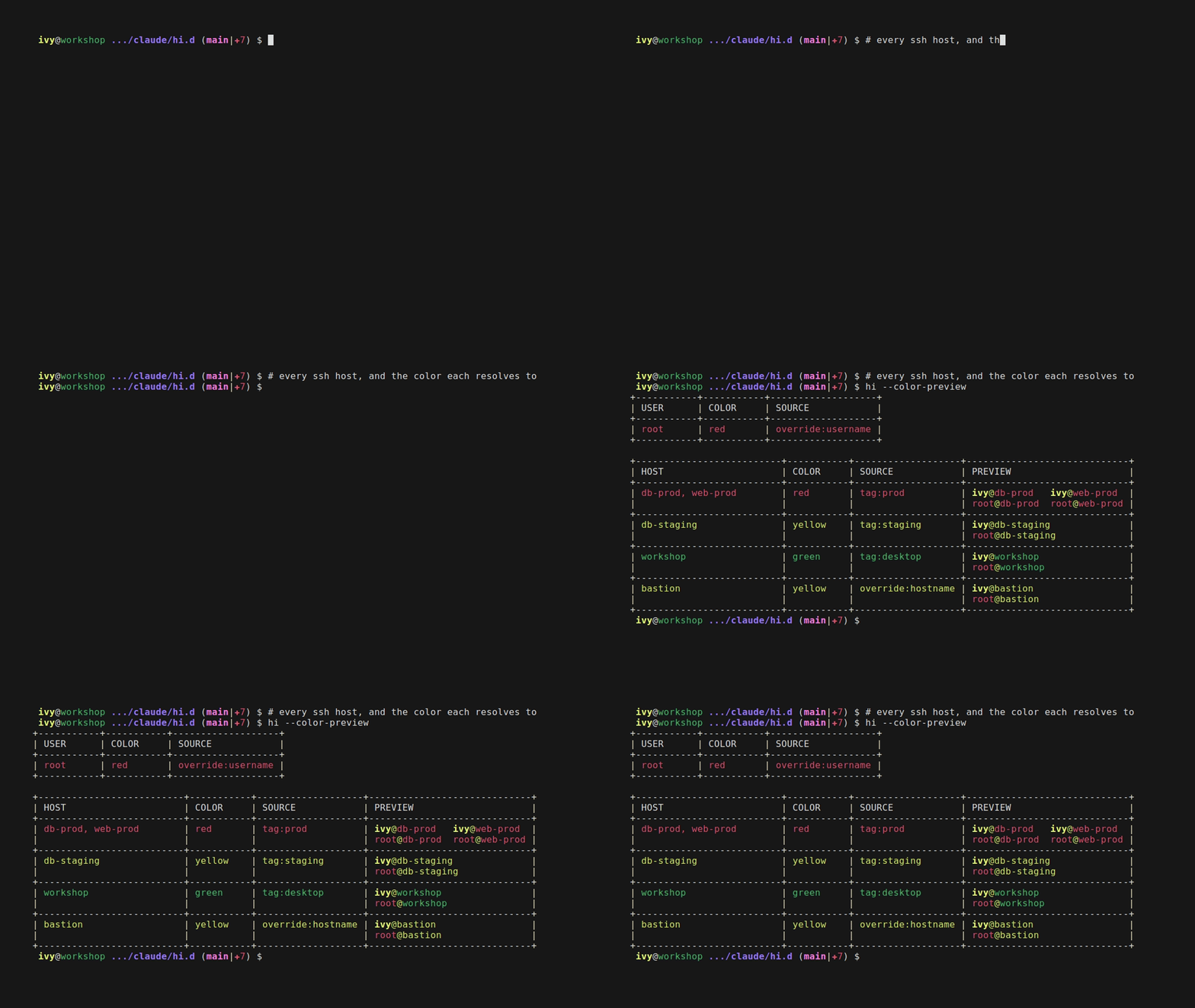
hi --color-preview answers what that adds up to - every host in your ssh config and every user it knows
of, drawn in the colors themselves, each row naming the rule it matched:
tmux
misc/tmux.conf is reached the way vim.rc is - through an alias, tmux -f <conf> - and overridden the same
way, by dropping your own ~/.config/hi.d/tmux.conf. Beyond the usual defaults it does one hi-specific thing:
it appends the _HI_* variables to tmux’s update-environment, so a window opened after attaching gets a
shell that can still find hi. Without it, tmux new-window on a remote box gives a bare prompt, the tmux
server predating the connection and knowing nothing about $_HI_HOME.
Two limits worth stating plainly:
-fis read when the tmux server starts, not when a client attaches, so attaching to an already-running server applies none of the config - tmux’s rule, not hi’s. Theupdate-environmenthalf still works, being refreshed on every attach.- The alias is defined only where hi.d is permanent - your own machine, or a target where
scripts/install.shhas been run. On a disposable target hi deletes the tree on exit and a detached tmux outlives the session, so every shell inside it would wake up reading a directory that is gone. Plaintmuxstill works there, without hi’s config.
Header details
Each is on by default; set it to 0 to hide that line. All are ignored when _HI_DISABLE_HEADER=1.
| variable | hides |
|---|---|
_HI_HEADER_BANNER |
the ~~~ Connected [host] ~~~ line, on connect and disconnect |
_HI_HEADER_TIMESTAMP |
the date/time line |
_HI_HEADER_SYSINFO |
the OS / CPU / RAM line |
_HI_HEADER_IDENTITY |
the git identity / containers / ssh key line |
_HI_HEADER_CHECK |
the installed-packages check (misc/packages) |
Everything else
| variable | default | what it does |
|---|---|---|
_HI_MAX_WIDTH |
80 |
terminal columns the header and banner are drawn to |
_HI_HOME |
derived | the parent of your hi.d directory - everything resolves $_HI_HOME/hi.d. Each entry point derives it from its own path when unset; set it to override |
_HI_TARGETS_TTL |
5 |
seconds hi <TAB> reuses its target list for; 0 disables the cache |
_HI_PROBE_TIMEOUT |
2 |
seconds any one backend CLI gets, during completion and in the header |
_HI_SSH_CONFIG |
~/.ssh/config |
read-only: where ssh hosts and their # Tags: comments are read from. Derived from $HOME by common/paths.sh every time it is sourced, so exporting your own value does not survive - point $HOME at another tree if you need a different config |
_HI_ASCII |
by locale | 1 forces ASCII stand-ins for the banner/prompt/packages glyphs (^ ok x for ↑ ✓ ✗), 0 forces the glyphs; unset asks the locale, so a LANG=C target degrades cleanly instead of printing mojibake |
NO_COLOR |
unset | not hi’s variable but the convention: any non-empty value renders everything - header, prompts, git segment - without color, and hi ships your client-side choice to the target next to _HI_ASCII |
_HI_PROMPT |
unset | starship hands the prompt to starship when the target has it, keeping hi’s header and aliases. Never auto-detected, and a target without starship silently keeps hi’s own. hi does not ship starship - a multi-MB binary against a 40KB payload |
_HI_SHELL_PREFERENCE |
login + $_HI_SHELL_TREE |
which shell a session runs in: an ordered list of bash/zsh/fish, plus login for “your own login shell”. The default tail is common/core.sh’s $_HI_SHELL_TREE (fish zsh bash mksh ksh dash ash sh) filtered to the shells hi styles, i.e. fish zsh bash - the same list hi.sh’s no-bash $_HI_SHELL_LADDER is cut from, so the two orderings cannot disagree. First one installed on the target wins; bash is the floor, since that is what load.sh needs to run at all. |
_HI_PROMPT_END |
per shell | the character each prompt ends with, when you want the same one everywhere; the three below win over it |
_HI_PROMPT_END_BASH |
\$ |
bash’s prompt separator (\$ is bash’s own escape for “$, or # for root”) |
_HI_PROMPT_END_ZSH |
> |
zsh’s prompt separator - zsh prompt escapes work here, so %# behaves as it does anywhere else in PS1 |
_HI_PROMPT_END_FISH |
\| |
fish’s prompt separator; root still gets # regardless |
_HI_TERM_FALLBACK |
1 |
on ssh targets missing a terminfo entry for your TERM (ghostty’s xterm-ghostty, typically), swap it for xterm-256color before the session starts; 0 keeps the original TERM |
_HI_HEADER_GHZ |
0 |
1 shows the header’s CPU line as x.xxx/x.xxx GHz instead of the default whole-MHz pair; ignored when _HI_HEADER_SYSINFO=0 |
_HI_PACKAGES_MIN_PRIORITY |
0 |
the lowest misc/packages priority the header’s check will print. The file ranks every entry 0-5 and each rank has its own pair of colors, so a rank can already hide its “not installed” half - what it cannot do is show less. Set 4 and a session gets a two-line check instead of a paragraph; set it above 5 and the check prints nothing at all rather than a blank line. hi --packages-preview marks the ranks it silences below floor and counts them under the legend, so the setting is legible before you connect anywhere |
_HI_ENABLE_FISH_ALIAS_ABBR |
0 |
fish only, off by default: 1 gives every alias hi defines a real abbr, so it expands to the full command on the line before you run it - it rewrites what your command line and history literally say, hence opt-in (hi_abbr_aliases does the work and is callable by hand in any fish shell). Not in the _HI_DISABLE_* table above since it’s fish-specific, not one of core.sh’s shared toggles |
_HI_TARGETS_TTL and _HI_PROBE_TIMEOUT exist because completion runs on every TAB and the header runs
before you get a shell: a docker daemon that’s down or a kubectl pointed at a dead cluster would
otherwise hang there with no upper bound.