hi.d
hi.sh -> sshrc supercharged
EXPERIMENTAL UNTIL v1.0.0-stable RELEASES
NOTE: Project is in active development, many things are subject to change and this current state is not a representation of final, published quality. This is a hobby project.








One config directory to rule them all, uniting all shells from all hosts!
Don’t sshush your hosts, say hi!
Contents
- Every target, the same session
- Requirements
- Installation/Usage
- Configuration
- Built from/with/in mind
- hi.d and the alternatives
- Testing
- More docs
- AI Usage
- Miscellaneous
Every target, the same session
The pitch is that hi behaves identically whatever is on the other end — an
ssh host, a container, an allocation, a pod — and whatever shell each side
runs. One GIF per backend, deliberately varying both sides, and each one
configured differently: the line under every GIF names the knob it is showing,
so the set reads as a configurable tool rather than one fixed look. The GIF at
the top of this README is the exception on purpose — it is the stock defaults,
with nothing turned off. How they are rendered, and what to catch when you
regenerate them, is at the bottom:
Regenerating the demo GIFs.
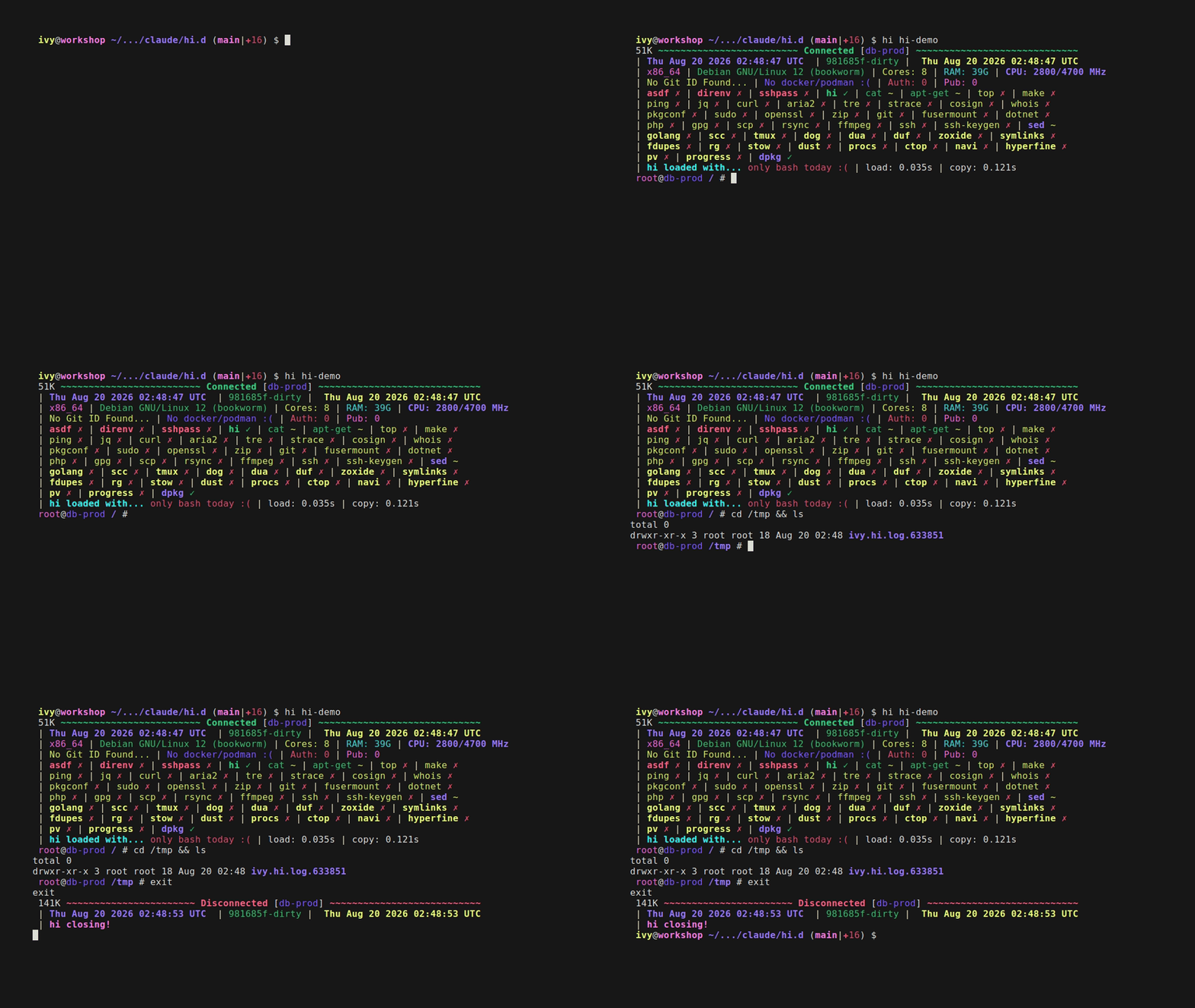
ssh, with a permanent install
The target carries its own ~/hi.d, so nothing ships over the wire — hi
loads the tree in place and leaves it alone on exit. Client: bash.
Showing _HI_HEADER_TIMESTAMP=0 and _HI_HEADER_SYSINFO=0 — set on the box,
not the client: a permanent install reads its own config, so this is the demo
whose knob lives on the target.
docker
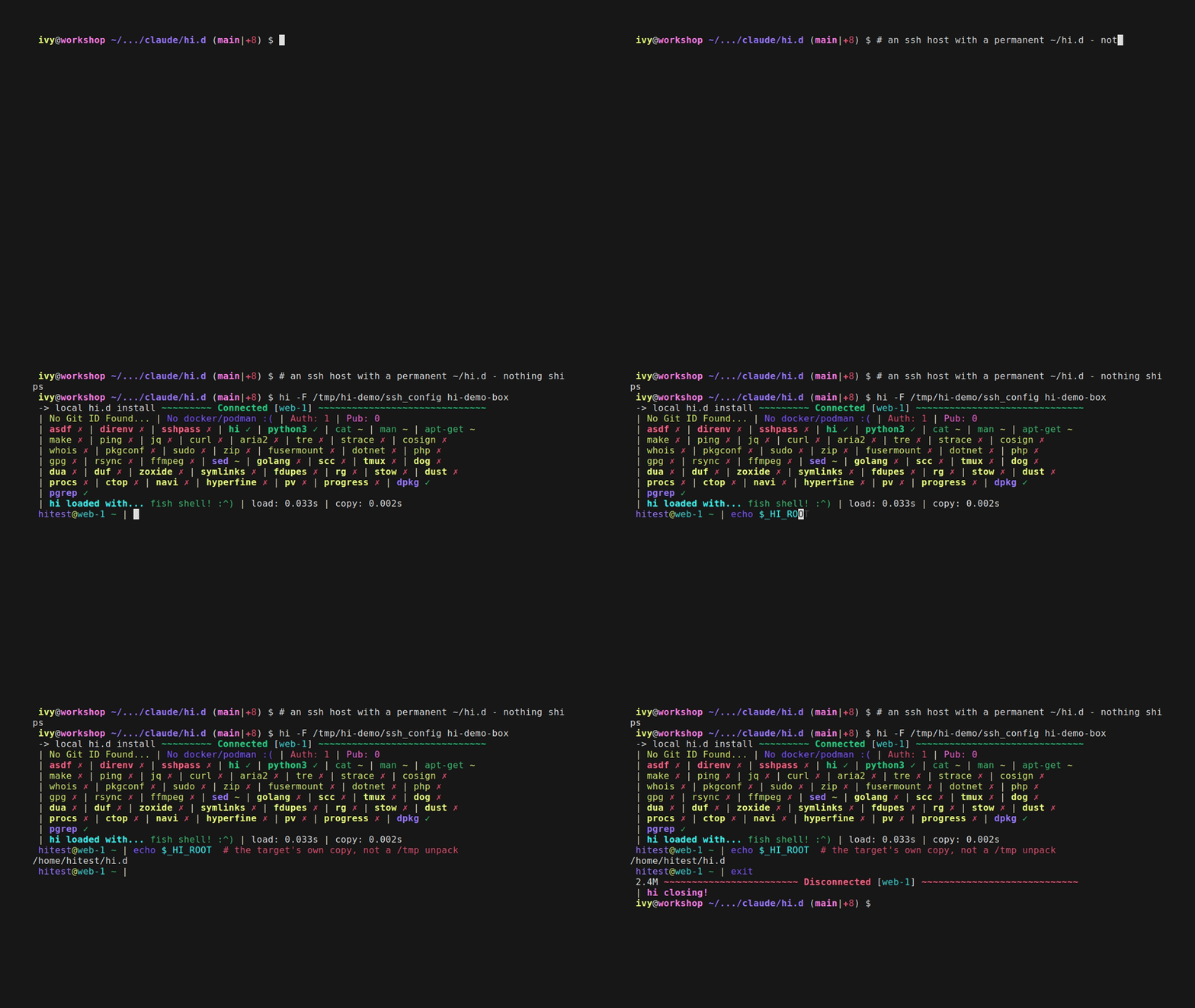
A debian/bash container, then an alpine box whose only real shell is zsh —
hi probes and falls back without being told. Client: zsh.
Showing _HI_PROMPT_END_ZSH and _HI_HEADER_CHECK=0 — the same debian target
as the GIF at the top, styled differently from the client side.
podman
A fish-only alpine container from a fish client: no bash anywhere in the
loop. Same session, same code path as docker.
Showing _HI_PROMPT_END_FISH — fish’s own prompt separator.

nomad
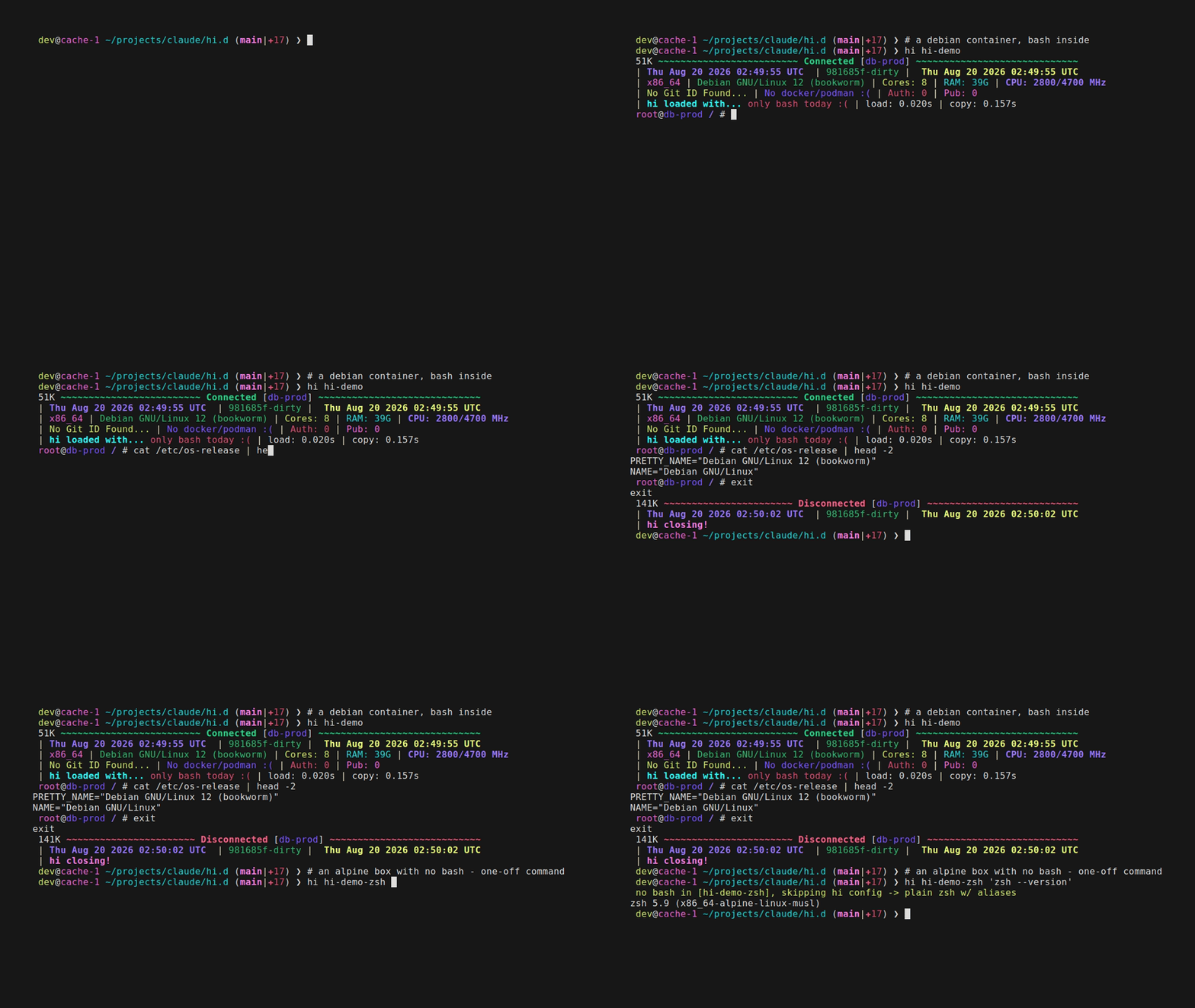
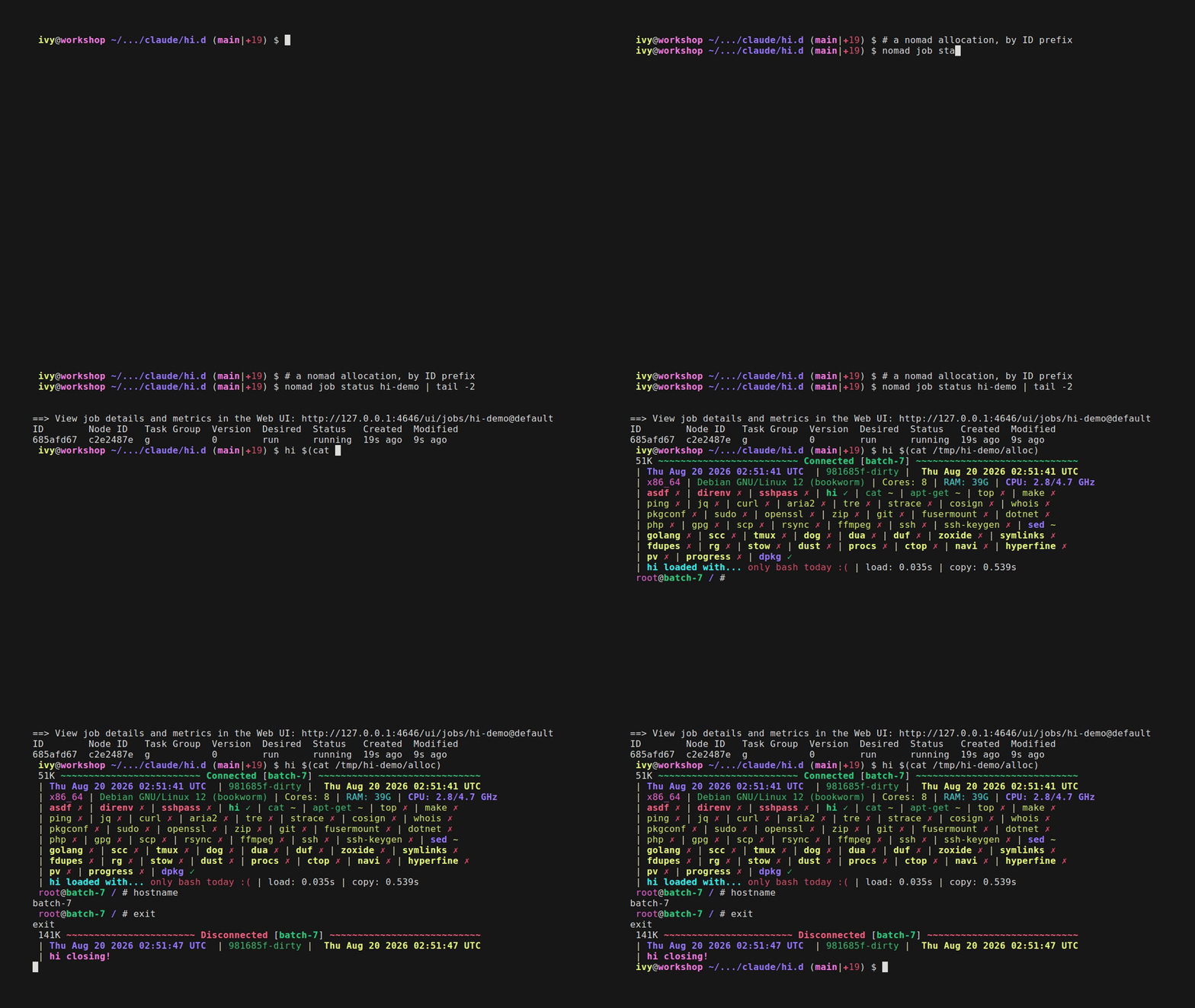
A dev agent, one docker-driver job, and hi <alloc-id-prefix> straight into
the allocation. Client: bash.
Showing _HI_HEADER_GHZ=1 and _HI_HEADER_IDENTITY=0 — the CPU line in GHz,
the identity row off.
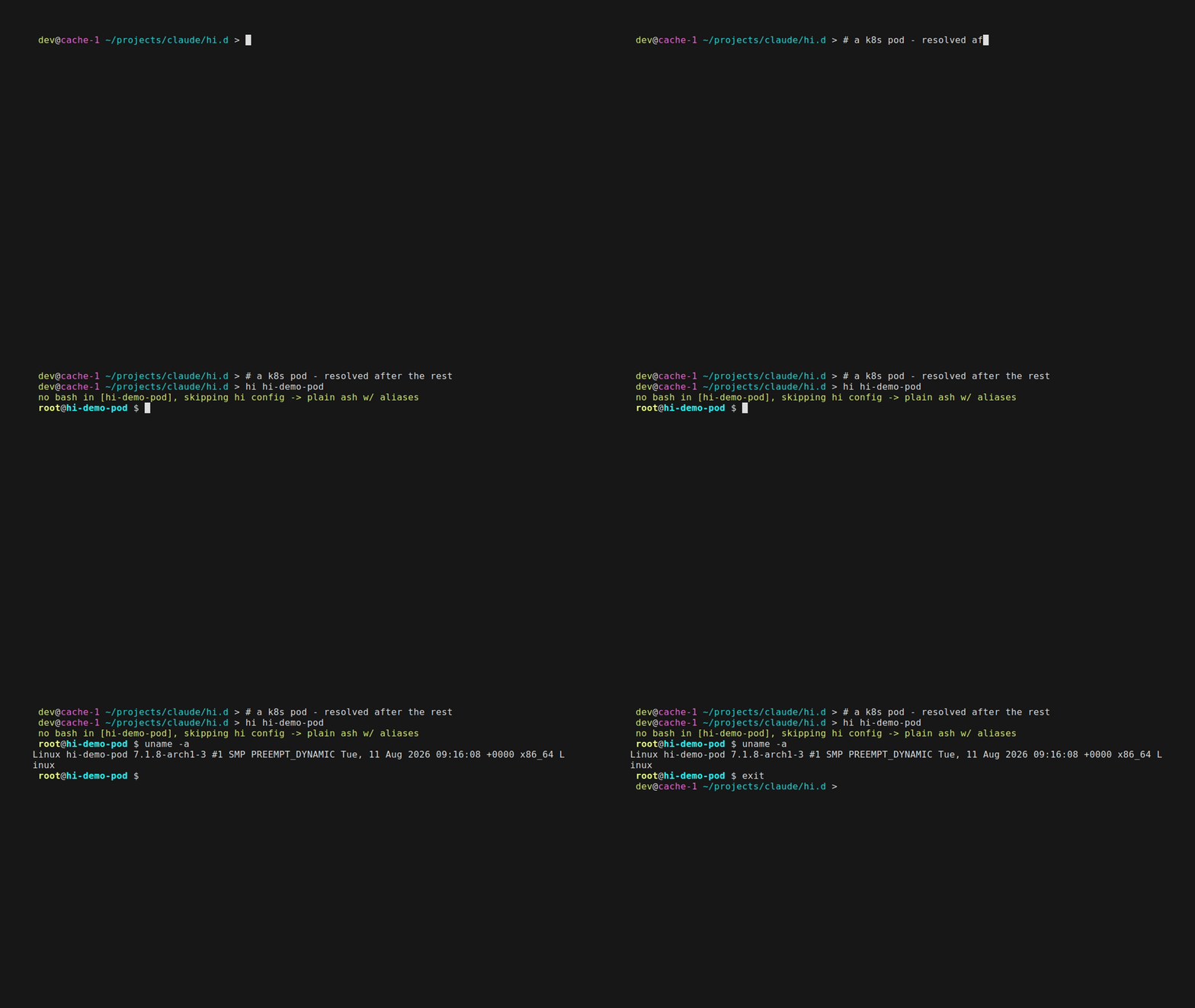
kubernetes
A kind cluster and a bare alpine pod — busybox ash is all it has, which is
hi’s aliases-only fallback. Client: zsh.
Showing _HI_DISABLE_GIT_STATUS=1 — the same prompt, without the git segment.
Requirements
- Client:
bashandbase64(for ssh targets - armors the bootstrap payload through the login shell; coreutils, busybox, macOS/BSD and Git Bash all ship one) ordocker/podman/nomad/kubectlfor the container/alloc/pod backends. - bash version: 3.2 or newer, on both ends - what macOS still ships, so hi stays clear of every bash-4-only construct: no
mapfile/readarray(_hi_read_linesincommon/core.shdoes that job), no associative arrays, no namerefs, no${x,,}. Enforced twice:tests/lint/shellcheck_test.shgreps for those constructs, andtests/targets/ssh_test.shruns a real bash 3.2 container target and fails on so much as one shell error. - Target:
base64for ssh targets (effectively everywhere - coreutils, busybox, macOS/BSD); nothing extra for container/alloc/pod targets.bashgets the full experience (header, colors, git prompt, aliases, vim/nano configs); without ithistill lands you in the best available shell (fish>zsh>ksh>sh) with the aliases and, on the POSIX tiers, a colored prompt - rather than failing outright. - Everything else (client and target) is plain POSIX/bash/zsh/fish shell - no compiled artifacts, no package manager, no build step.
Installation/Usage
hi.d/scripts/install.sh(re-run it any time; it repairs its own lines, even if hi.d moved) - before touching your shell rc files it validates whichever of~/.bashrc,~/.zshrcand~/.config/fish/config.fishare installed with each shell’s own syntax checker, and asks whether to continue if any have issues- reload your shell!
- run
hi --configureany time afterward to revisit the feature toggle prompts - header, prompt, personal settings, git status, editors, aliases, header details, terminal width, and whether hi styles this machine too or only the hosts you sayhito - without touching the shell rc wiring. Answers land in~/.config/hi.d/settings.sh; see Configuration below - run
hi --check-configsany time to just re-run that shell rc validation, without the rest of the install - run
hi --help(orhi -h) for the short version of all of this: the synopsis, the target resolution order, and every flag hi answers itself.man hiis the long version. Everything hi does not answer is passed tosshunchanged - run
hi --versionto see what is installed - the packaged version, orgit describein a checkout; the doctor and the connect header show it too - run
hi --tmux <target>to have the session live inside a named tmux on the target, so a dropped connection detaches instead of losing work - run it again to reattach (_HI_TMUX_ATTACH=1makes it the default,--no-tmuxturns it off,_HI_TMUX_SESSIONnames the session). Offered only where hi.d is permanent on the target: a disposable tree is deleted when the session ends, and hi says so rather than leaving a tmux pointing at nothing - run
hi --doctor(orhi --doctor <target>, to test one host) when something is slow or failing: it reports the tree, the config overlay, every backend probed and timed with the same ceilings the header and completion use, and - with a target - which backend the name resolves to plus an ssh reachability/tooling check, all read-only - configure
~/.ssh/configtags via sshm - [optional] pin specific colors in
~/.config/hi.d/colors- everything else gets a color automatically. Copyhi.d/misc/colorsthere to start from the shipped defaults- run
hi --color-previewto preview what every ssh host/your user resolves to
- run
- [optional] copy
hi.d/misc/packagesto~/.config/hi.d/packagesand edit it to your preferences- run
hi --packages-previewto see what each priority means, the colors it renders installed and missing packages in, one real example of each from your own file, and the check itself as a connect will print it
- run
- say
hi! - [optional] modify
~/hi.d/misc/*and~/hi.d/shells/*to your liking - though anything with an overlay (settings.sh,colors,packages,tmux.conf,aliases.sh) is better edited in~/.config/hi.d/, which keeps the checkout clean forhi --update- tip:
~/hi.dis a git checkout, so if you do edit it, push to your own fork and clone that on your next device - same setup everywhere, kept in sync byhi --update
- tip:
- done with it?
hi.d/scripts/uninstall.shis the install’s inverse: it strips hi’s lines back out of your rc files, removes thesettings.shit wrote, and unlinks/usr/bin/hi. It leaves thehi.ddirectory alone, and yourcolors/packagestoo - delete those yourself if you want them gone
Usage: hi foo (just like ssh!)
Reminder - place local only changes after the “# hi-config-end” comment in the local files.
Configuration
Your config lives outside the checkout, in ${XDG_CONFIG_HOME:-$HOME/.config}/hi.d/, and rides along to
every host you say hi to in its own small archive - colors, packages, tmux.conf and aliases.sh
overlay the tree’s copies one file at a time, and settings.sh (what hi --configure writes) has no in-tree
counterpart at all. The full picture - the overlay file table, every _HI_DISABLE_* feature toggle, the
header-line toggles, tmux’s update-environment behavior, and every other environment variable hi reads
(_HI_SHELL_PREFERENCE, _HI_PROMPT, _HI_ASCII, _HI_HEADER_GHZ, …) - is in
docs/CONFIGURATION.md.
Hostname, username, and group/tag colors
Every username and hostname gets a color deterministically derived from its name - nothing to generate, nothing that can go missing. To pin one instead, add a line to ~/hi.d/misc/colors (username,root,red / hostname,prod-db,yellow / hosttag,desktop,green); hosttag entries match the leftmost tag in a # Tags: ... comment directly above a Host line in ~/.ssh/config. hi --color-preview shows what every ssh host and your user currently resolve to, in their actual colors.
How it works
hi.shruns on the client, tarshi.d/and sends it to the target, which unpacks it into a/tmpdirectory.$_HI_PAYLOADat the top ofhi.shis the authoritative allow list - no.git,scripts/,tests/,docs/or CI. Your overlay (see Configuration) follows in a second, much smaller archive, landing in aconfig/of its own so youraliases.shstays additive. A target that already has its ownhi.dgets neither: hi loads that tree in place and it reads its own overlay.- Both are base64-armored into one script and written over the stdin of an ssh connection the session
then reuses - not argv, which Linux caps at 128KB however big
ARG_MAXsays it is. That script is whathiprints the size of on connect, and what the payload badge measures - for a default configuration: a client whose overlay turns off the editor overrides or the OSC 52 clipboard ships less, since hi does not send files it has already been told not to use. That badge is not the package badge beside it and the two should not be read as one number: the payload is what crosses the wire for a single ssh session, while the package badge is what you download from a release and what it costs on disk once installed - which is the larger figure, sincescripts/and the docs ship in a package and never on the wire. - On the target,
load.shprints the header, appends hi’s shell configs to the host’s own rc files, and drops you into your login shell when hi styles it (bash, zsh, fish), else the best of$_HI_SHELL_TREE(fish > zsh > bash > mksh > ksh > dash > ash > sh) the target has._HI_SHELL_PREFERENCEis that rule as a setting. - On exit,
load.sh’strapstrips those additions back out and the/tmpdirectory is removed. hi <target> 'some command'skips the session and runs the command there instead, the waysshdoes.
The bootstrap is plain POSIX sh, so a target with no bash still gets a session - the best plain shell it
has, with the aliases loaded, rather than the full load.sh. For ssh targets hi first checks, over the same
connection so it costs no extra authentication, whether a permanent hi.d is already there; if so it uses
that in place and copies nothing. It does not assume ~/hi.d: the check reads the _HI_HOME line
install.sh wrote into that target’s login rc files (or /etc/profile.d for a packaged install) and falls
back to ~/hi.d, so a tree installed anywhere is still found and reused. hi --doctor prints the wire size
and the unpacked size, labeled.
IMPORTANT: Local-only changes MUST stay in ~/.bashrc, ~/.zshrc, ~/.config/fish/config.fish, etc. - anything in ${XDG_CONFIG_HOME:-$HOME/.config}/hi.d/ is copied to every host you say hi to.
Built from/with/in mind
- sshrc - from - (became
hi.sh) - sshm - with - (optional, but highly recommended to configure
~/.ssh/confighosttags) - bat - in mind - (essentially my reason to get the aliases.sh fallthrough logic to work as portably as possible)
- fish - with - (my preferred shell because its defaults/built-ins are extremely easy to understand, but one that is not POSIX-compliant)
Docker / Podman containers
hi <name> also works against a running docker or podman container. If <name> isn’t a Host in ~/.ssh/config but is a running container (by name or ID, docker checked first), hi copies ~/hi.d in and chainloads load.sh exactly as the ssh path does, for an identical session. No armoring is needed (docker exec -i/podman exec -i pass stdin as raw bytes), and cleanup happens on exit. Podman’s CLI is close enough to reuse the same command shapes. The container needs bash for the full experience; without it hi drops you into the best plain shell available (zsh/fish/ksh/sh) with the aliases and a warning.
Nomad allocations
hi <alloc-id> also works against a running Nomad allocation (matched by ID/prefix, after the ssh-host and container checks) - same session, same code path as docker. Since nomad alloc exec has no docker cp/-e equivalent, files stream in with exec -i + cat > and env vars go through a sh -c "export ...; exec ..." wrapper. A multi-task allocation picks its task with hi <alloc-id>/<task>, which becomes nomad alloc exec -task <name>; a plain hi <alloc-id> is unchanged, and completion offers the pairs for any allocation that has more than one task.
Kubernetes pods
hi <pod-name> also works against a running Kubernetes pod (checked last, after ssh/docker/podman/nomad) - same idea again, using kubectl exec with -- separating its own flags from the remote command. Uses whatever context/namespace your kubectl is currently pointed at; a multi-container pod picks its container the same way Nomad’s tasks do - hi <pod>/<container>, which becomes kubectl exec -c <name>. Without the suffix kubectl still falls back to the pod’s first container with a warning, so the suffix is how you say which one you meant; completion offers pod/container for every pod that has more than one.
Windows hosts
hi <target> works against Windows OpenSSH targets too, at whatever level the target supports:
- WSL, Git Bash, Cygwin or MSYS2 reachable on
PATH: the full experience (header, colors, git prompt, aliases) - same code path as any other ssh host. - Stock Windows OpenSSH with no
bashat all:hifalls back to a plain interactive PowerShell session (no hi.d styling - that’s bash-only) rather than failing outright. It still costs one authentication: hi writes its bootloader over the first of two calls multiplexed on the same ssh connection, and a target where that write cannot runsh -cis a target with no POSIX shell, which is exactly what the fallback is for.DefaultShellset to PowerShell lands in the same place.
Installing hi on Windows: use WSL. The .deb from the releases page installs into a WSL distribution unchanged - /etc/profile.d/hi.d.sh, /usr/bin/hi, everything as on any Debian - and WSL is where a Windows developer already using ssh/docker/kubectl most likely works.
hi.d and the alternatives
How hi.d compares to sshrc, xxh, kyrat, sshdot and homeshick, which
adjacent tools compose with it rather than compete, what actually makes it
different, and where another tool is the better choice:
docs/ALTERNATIVES.md.
Compatibility
Two questions, because hi answers them at two different moments. Legend: ✅ exercised by a suite on every run · 🟡 expected to work, nobody has proven it · ⚠️ works, reduced · ❌ not supported.
1. The target’s OS — can hi land a session there at all?
| target OS | result | proven by |
|---|---|---|
| Linux, glibc (Debian/Ubuntu/Fedora/Arch…) | ✅ full session | tests/targets/ssh_test.sh, on Debian bookworm |
| Linux, musl + busybox (Alpine…) | ✅ full session with bash installed, ⚠️ aliases-only without |
ssh_test.sh, on Alpine 3.20 |
| macOS | 🟡 full session — bash 3.2 is what it ships, and the suite runs a real bash 3.2 target; the client half (BSD sed/mktemp/base64) is unit-tested only |
ssh_test.sh bash-3.2 case; .github/workflows/macos-e2e.yml is written but has never run |
| WSL | 🟡 it is Linux, and the .deb installs into it unchanged |
— |
Windows, with Git Bash/Cygwin/MSYS2 on PATH |
🟡 full session, same code path as any ssh host | .github/workflows/windows-e2e.yml, written, never run |
Windows, stock OpenSSH (cmd.exe/PowerShell) |
⚠️ plain PowerShell session, no hi styling — the fallback is deliberate, not a failure | same, never run |
| *BSD, Solaris/illumos | 🟡 nothing in hi is Linux-specific past the header’s /proc probes, which degrade to ? |
— |
2. The shell you end up in — what hi hands you once it is on the target.
| session shell | result | note |
|---|---|---|
bash ≥ 3.2 |
✅ full: header, prompt, git status, aliases, editor configs | 3.2 is the floor because macOS still ships it |
zsh |
✅ full | shells/zsh.zsh |
fish |
✅ full | shells/config.fish |
sh/dash/ash (no bash on the target) |
⚠️ aliases and a colored user@host prompt, with a warning saying so |
no header and no git segment - those need bash |
ksh/mksh (no bash on the target) |
⚠️ aliases, the colored prompt and a live git segment - no header | it reads $ENV as the sh tier does, plus shells/ksh.sh: ksh93 and mksh expand $( ) when the prompt is printed, which is what lets the segment be live where busybox ash cannot have one. The header needs bash. tests/targets/ssh_test.sh renders the segment against a real mksh |
nushell, elvish, xonsh, ion, oil/osh |
❌ decided against, not pending | see the table below. You still get a session — hi lands you in the best of $_HI_SHELL_TREE the target has |
| PowerShell | ❌ | bash-only by design |
Shells hi does not style, and why that is settled. Each would need its own rc in shells/ (prompt,
aliases, completion) plus a tier in the fallback ladder in hi.sh’s _hi_remote_suffix and load.sh’s
load().
| shell | status | why |
|---|---|---|
elvish |
decided against | its own language, so the prompt and aliases would be a second implementation to keep in sync forever, for an audience hi has no evidence of. A shells/rc.elv is what it would take, and nobody has asked |
xonsh |
decided against | Python — a third implementation, on the same terms as elvish and with the same answer |
tcsh/csh |
decided against | different rc syntax and no $ENV equivalent, so there is no hook to land on at all: it would need its own rc and its own delivery mechanism |
nushell |
decided against | Nu is not POSIX, so it can source none of common/ |
ksh/mksh |
shipped, all but the header | a tier in the no-bash ladder, the POSIX prompt, the aliases, and shells/ksh.sh’s git segment. The header, and only the header, is missing: common/header.sh is bash, and this tier is defined by bash being absent, so it would have to be written a second time in POSIX and then kept in sync forever - the git segment was worth that, a second header is not |
| PowerShell | not a POSIX shell | the greeting hi prints there is the whole extent of it |
Using one of these as a login shell still works, and always did — hi lands you in the best of
$_HI_SHELL_TREE (fish > zsh > bash > mksh > ksh > dash > ash > sh) the target actually has. Only the
session shell is limited, and only for the three above.
If you use a shell framework, hi lands you in your own login shell, so it loads normally — that is what
_HI_SHELL_PREFERENCE’s default (login, then the styled head of $_HI_SHELL_TREE: fish zsh bash) means. tests/targets/framework_test.sh tests
oh-my-zsh, powerlevel10k, starship and bash-it against hi, each asserting the session comes up with no shell
errors and that hi neither changed zsh’s array base under them nor dropped their PROMPT_COMMAND.
Testing
tests/test_runner.sh (reachable as hi --test once installed) runs the suite and prints a colored
pass/fail summary; --group fast is what CI runs on every push/PR. The runbook - all four suite groups,
the parallel container cases, the lint gate, relaying, _HI_HOME, and why the tests are local-only - is in
docs/TESTING.md.
More docs
- docs/CONFIGURATION.md - the config overlay, every feature toggle and environment variable hi reads
- docs/ALTERNATIVES.md - sshrc, xxh, kyrat, sshdot and homeshick side by side; what makes hi.d different, and when another tool is the better choice
- docs/TESTING.md - the test runner, suite groups, parallel cases, the lint gate, relaying
- docs/GLOSSARY.md - the named idioms the code’s
GLOSSARY:comment tags point at; load-bearing for readingcommon/, and drift-checked by the lint suite - docs/SECURITY.md - reporting, and what hi touches on a target
- docs/PACKAGING.md - the publishing runbook: cutting a release, the per-channel steps, and the Windows channel assessment
- docs/ROADMAP.md - what is planned, what each item is blocked on, and the one-time setup the release channels wait on
AI Usage
Heavily inspired by: Dictionarry/Profilarr’s AI Transparency Statement
This started as code written entirely by me, but I have used generative AI to write large parts of it. All of the code here is my responsibility regardless: AI is a tool, not an owner of a project. I have personally understood, reviewed and approved all of the AI-generated code in this repository, and mainline releases carry the same accountability to me as anything I write and publish myself.
Miscellaneous
Regenerating the demo GIFs
docs/tapes/generate.sh renders all of them: one vhs run per tape, cheapest first,
with a fixtures.sh down in between — no tape cleans up after itself — and a summary of what rendered, what
stood down for a missing backend, and what failed. Name tapes to render a subset (generate.sh docker kube);
--list shows them, --down clears up after a crashed run. Manual artifacts, reviewed by eye — regenerate
whenever the header or prompt changes, and look at what came out before committing it.
By hand it is one vhs docs/tapes/<name>.tape per GIF from the repo root, with the backend running and hi
on PATH; docs/tapes/fixtures.sh builds every target the tapes connect to, fixtures.sh down removes them.
There is one more in CONFIGURATION.md — color_preview.tape, the only one
needing no backend at all.
Two things to get right when you do it that way — the two the script exists to take care of. hi on $PATH
must be this checkout (/usr/bin/hi may point elsewhere; the script shims its own onto the front of
$PATH). And the target image builds from HEAD, so uncommitted work shows on the client side of the GIF
but not the target’s: render from a commit, or set HI_DEMO_SOURCE=worktree, which is what the script picks
for you on a dirty tree.
Both sides of every GIF are staged, not inherited. Each tape sources a small rc
fixtures.sh writes, giving the outside shell hi’s own prompt under a chosen
user@host instead of the renderer’s — and every target gets an explicit
hostname rather than a backend’s random hex ID. The pairs vary on purpose:
docker’s client is cache-1 and one of its targets is cache-1 too, while the
rest say hi somewhere they are not.
Verifying a release download
Releases ship a SHA256SUMS, signed build provenance, and a detached minisign
signature over the sums (the offline half — no gh, no network, one static public key):
sha256sum -c --ignore-missing SHA256SUMS                        # the bytes match the release
minisign -Vm SHA256SUMS -P 'RWT-PLACEHOLDER-see-ROADMAP-secrets-and-keys'
gh attestation verify hi.d_*_all.deb --repo ivylikethevine/hi.d # which CI run built them