sharerr
EXPERIMENTAL UNTIL v1.0.0
Share your media library with friends, over the tools you already run.







sharerr connects to your *arr apps (Sonarr, Radarr, Lidarr, Readarr, Whisparr), finds everything tagged sharerr, builds a torrent for each file where it already sits, seeds it through your torrent client (qBittorrent, Transmission, rTorrent or Deluge), and publishes the lot as a Torznab feed. Your friend adds that feed to their Prowlarr; their Sonarr and Radarr then find your releases with the TVDB/TMDb/IMDb ids attached, so a release matches a known series or film rather than being guessed from its filename.
Nothing is copied, renamed, re-linked, or moved. That is the constraint the whole design is built around.
View these docs as a website. The reference material is indexed in docs/README.md; deployment layouts are in docker/deploy/.
Contents
- What works today
- Screenshots
- Quickstart
- Sharing with a friend
- Sharing music, books, and more
- Friends finding each other
- Topology
- Sharing a plain directory, no *arr app at all
- Authenticating to qBittorrent
- Using Transmission instead of qBittorrent
- Using rTorrent / ruTorrent instead of qBittorrent
- Using Deluge instead of qBittorrent
- The CLI
- Building and testing
- Layout
- Getting help and contributing
- AI usage
- Roadmap
- Licence
What works today
- Sources: discovery by tag from Sonarr, Radarr, Lidarr, Readarr and Whisparr, or a plain directory with no *arr app at all.
- Seeding: torrents built in place, files never moved; seeding through qBittorrent, Transmission, rTorrent/ruTorrent or Deluge; per-torrent upload cap and seed-ratio goal; a built-in BitTorrent tracker served by sharerr itself.
- The feed: Torznab for Prowlarr, Jackett-compatible URLs and JSON results, media metadata in the release (resolution, codecs, channels, runtime; sample rate, bit depth and real format for audio).
- Friends: per-friend keys with revoke and last-seen; per-friend scoping (this friend sees TV, that one films); revoking a friend cuts tracker access too; safe rotation of the shared announce token; one-string pairing with a friend who also runs sharerr; peer endpoint memory, signed endpoint gossip between friends, and the lighthouse for a friend whose address rotated while nobody was watching.
- Networking: a dynamic endpoint from gluetun (rotating exit IP and forwarded port), a Topology page drawing sources, this instance and friends in one picture, a live per-torrent swarm view with hourly history, and a reachability script for checking from outside your network.
- The web UI: first-run wizard, settings with connection tests, an Items page with per-item detail (including how a friend’s Sonarr or Radarr reads the release title, and what would stop it matching) and manual retry/rebuild/unshare, one at a time or over a selection, library composition, sync history with a Sync now button, self-refreshing status tiles, a setup checklist, and path-mapping diagnostics.
- Operations: webhook notifications (generic, Discord, Apprise, ntfy, Gotify, Telegram, Pushover) on eleven triggers plus an Uptime-Kuma-style heartbeat, config backup and restore,
/metrics(OpenMetrics) and a dashboard-widget JSON endpoint behind a bearer token with ready-made Grafana, Homepage and Home Assistant views, a read-only management API behind its own token, and an OpenAPI 3.1 document for the machine-facing API.
Which apps, clients and indexers are supported, how the three clients differ, and what was tried and deliberately left out is in docs/COMPATIBILITY.md.
Screenshots
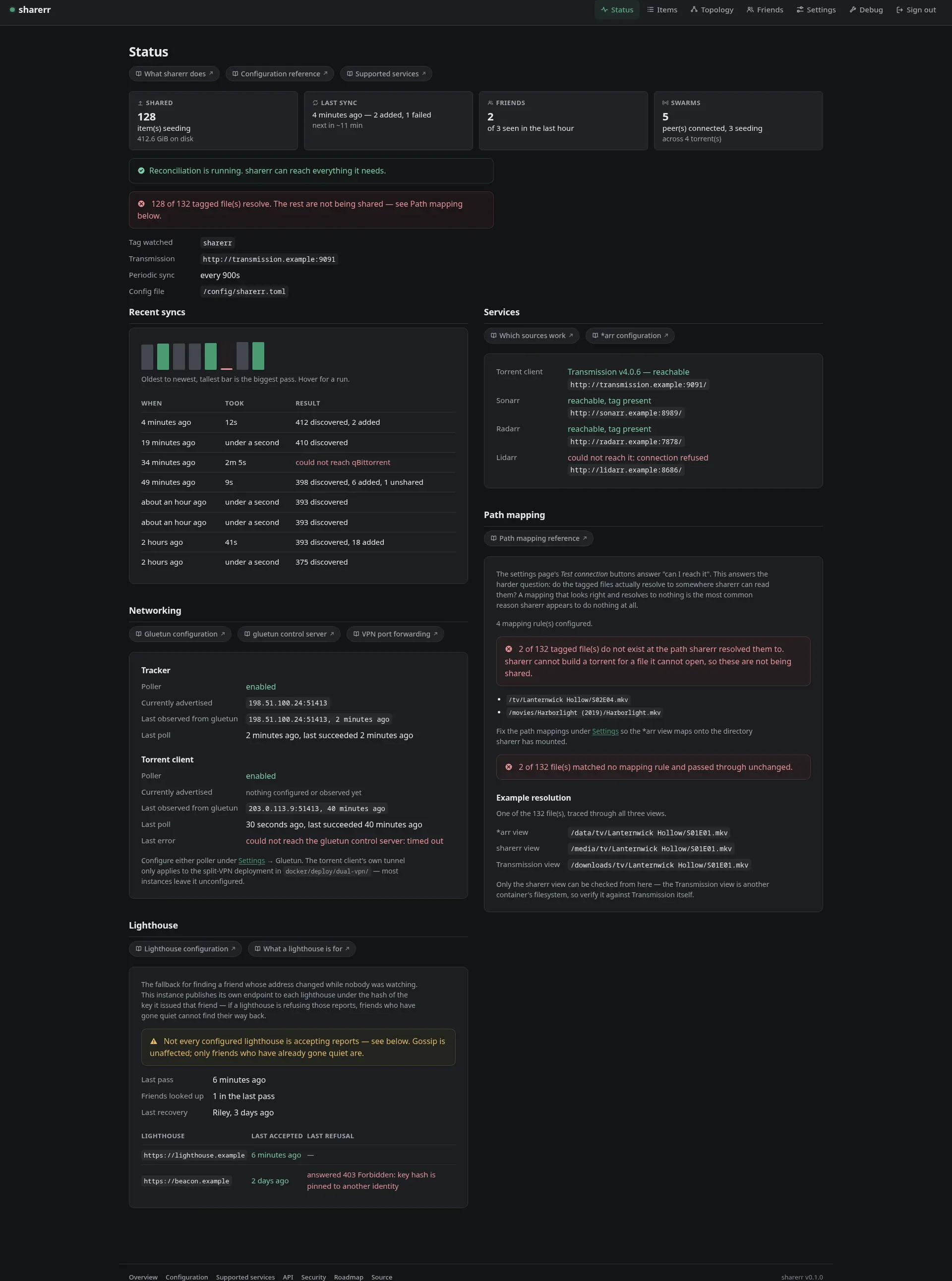 | 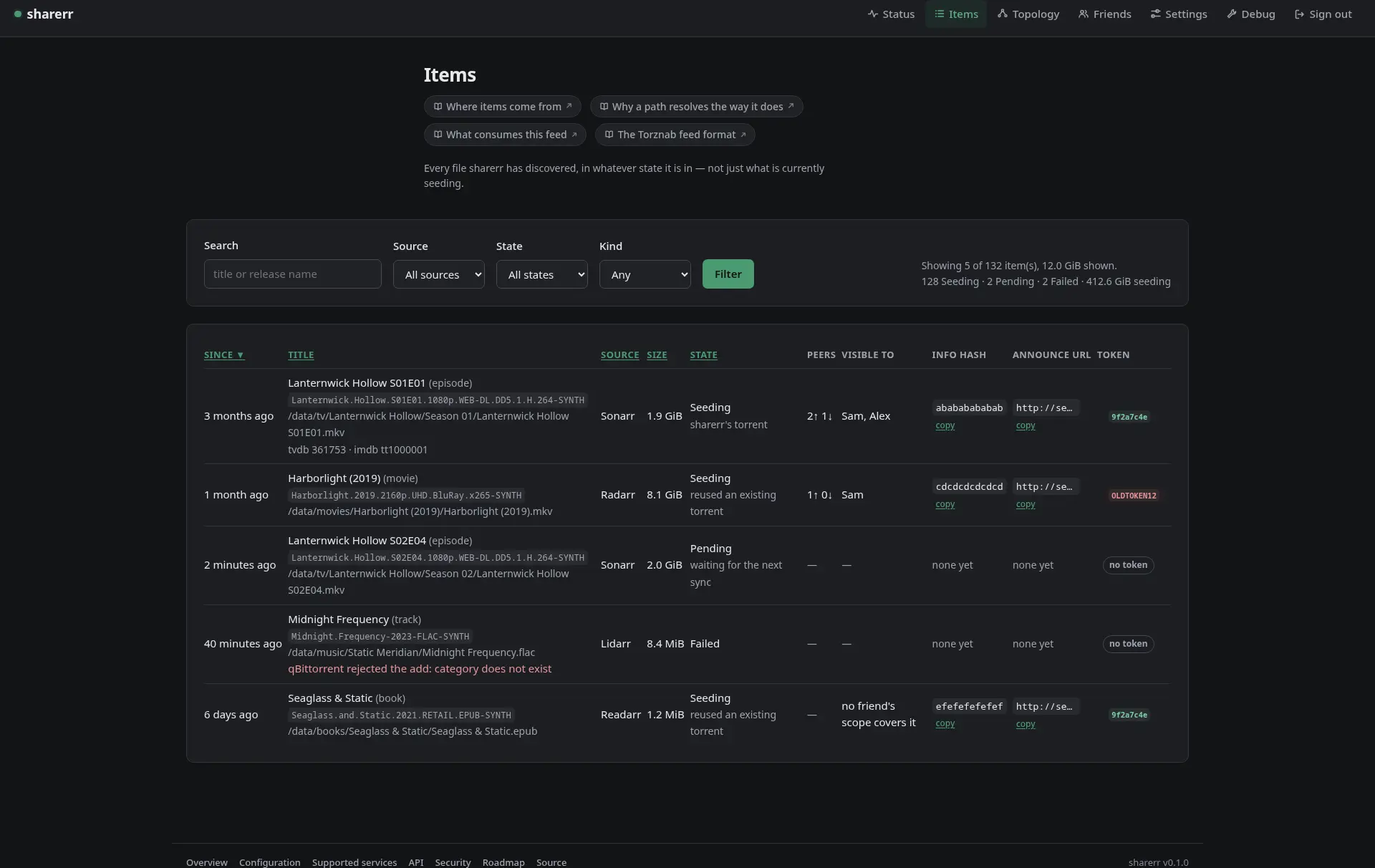 |
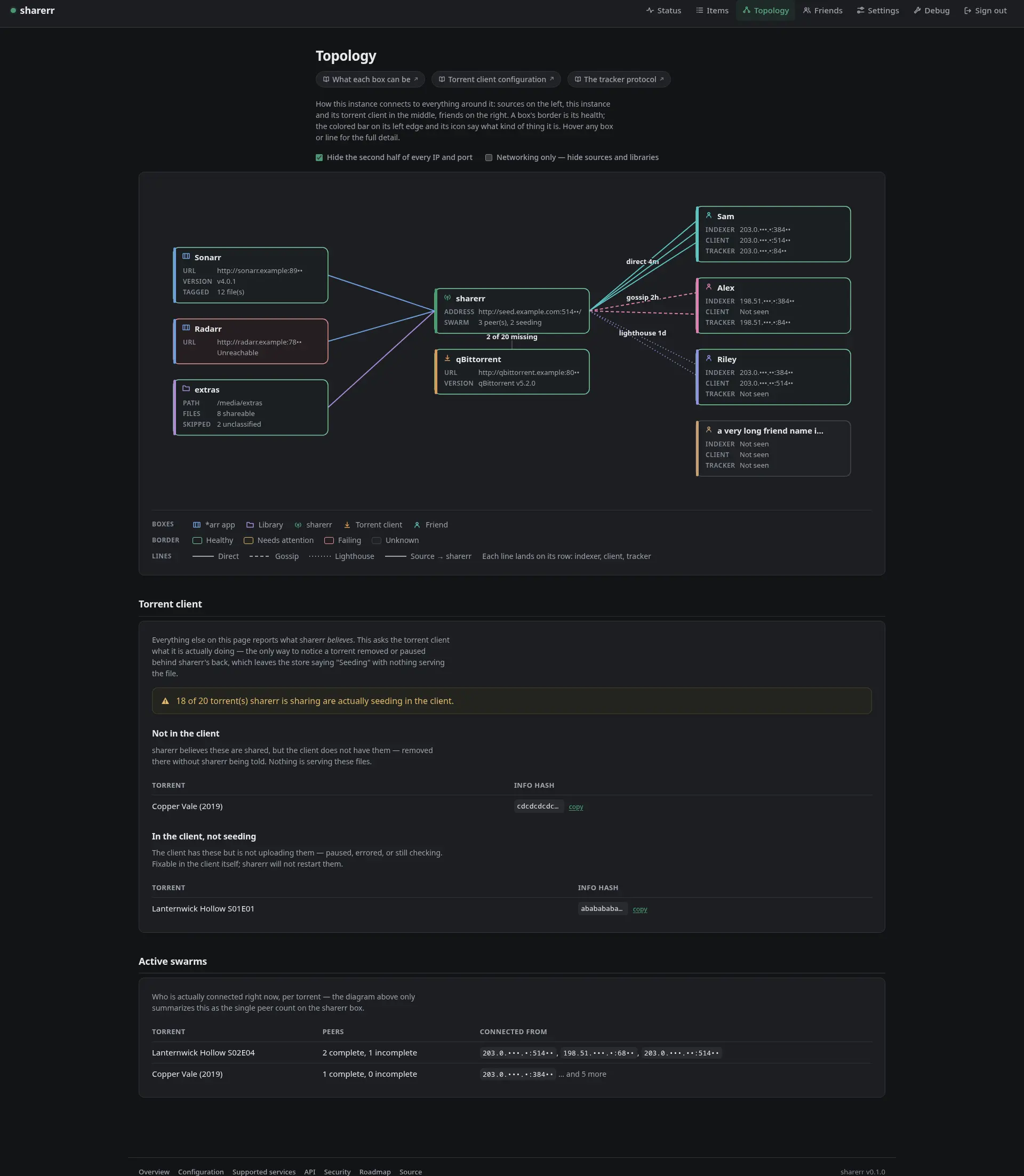 | 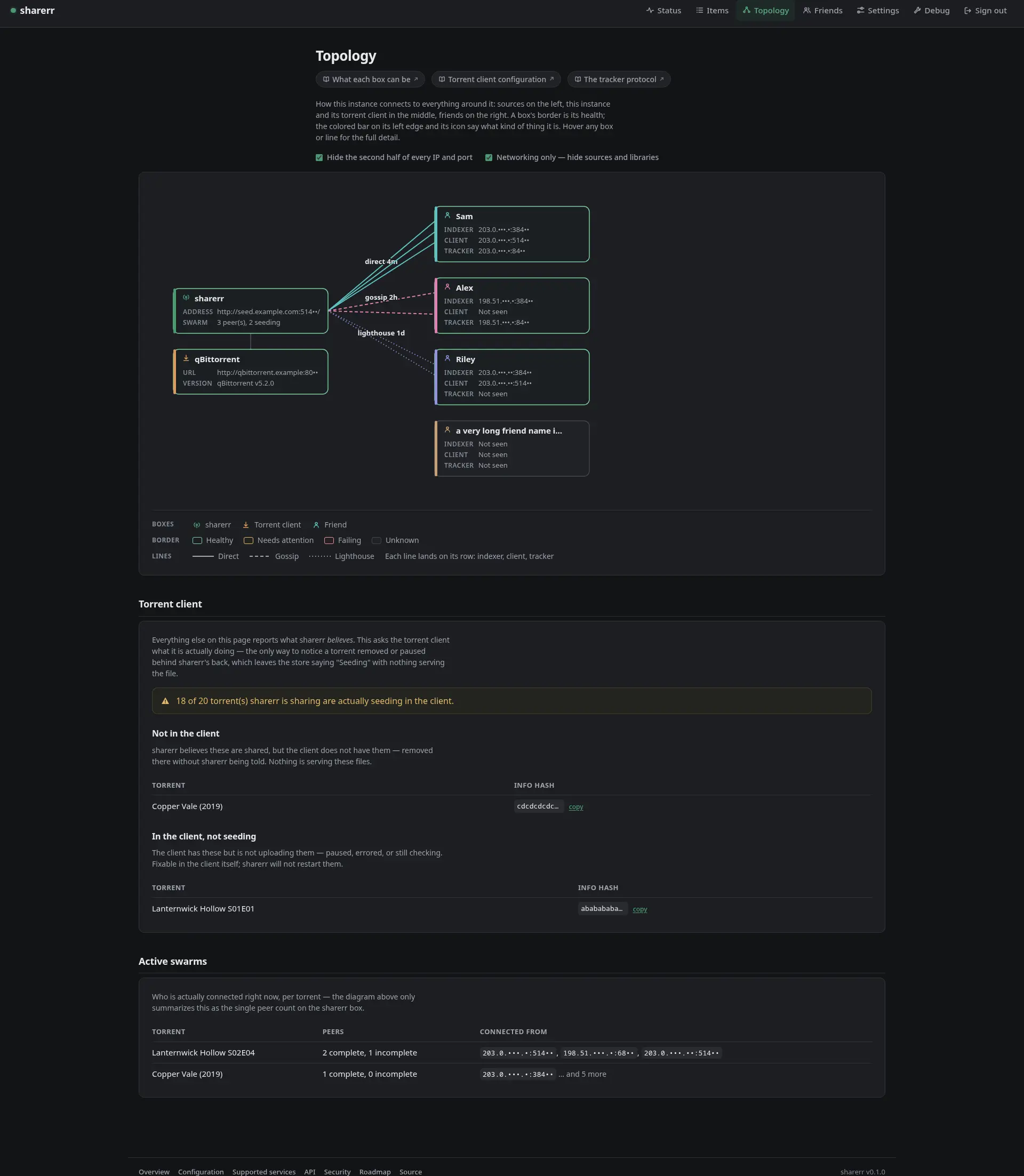 |
 |  |
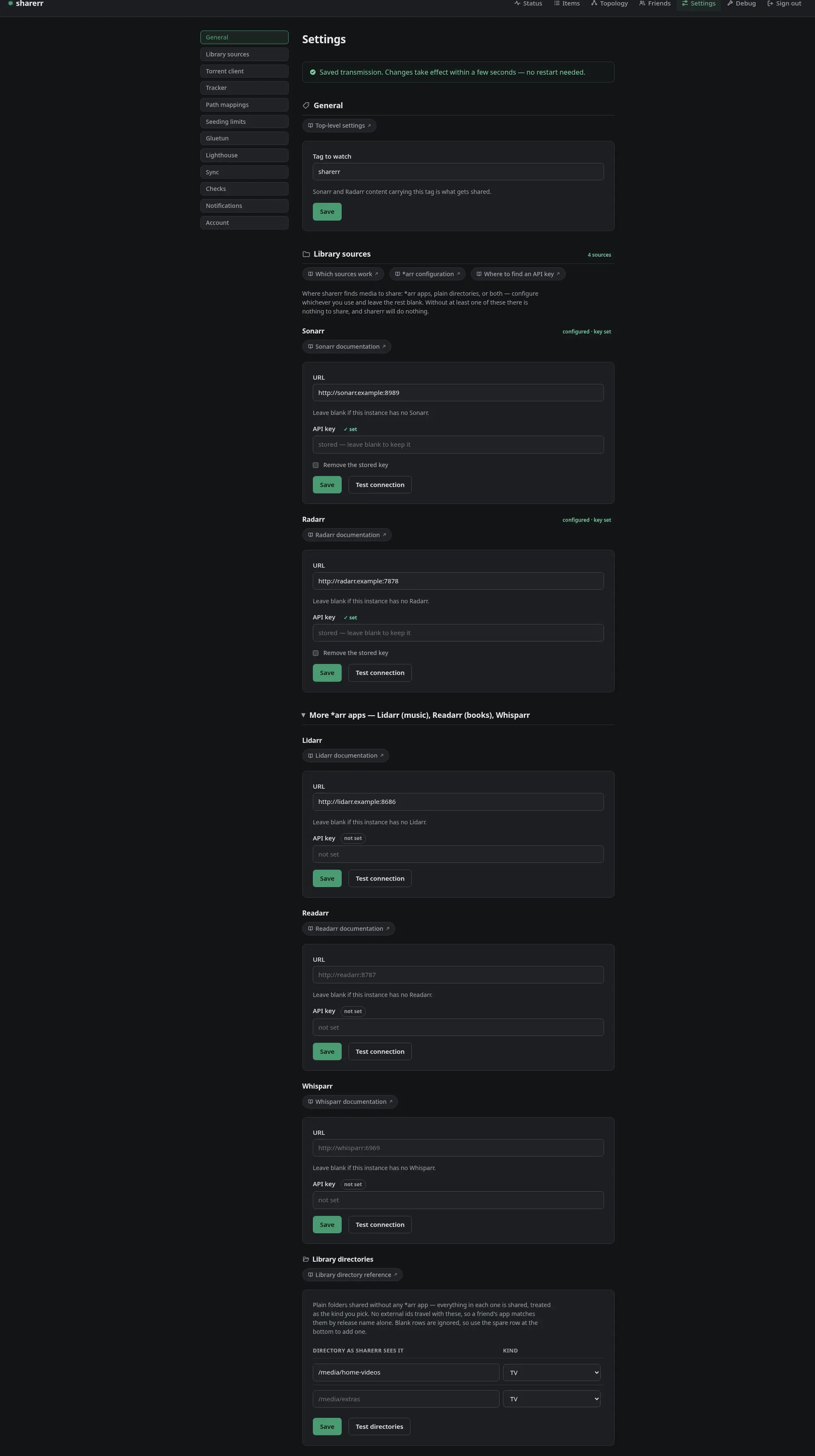
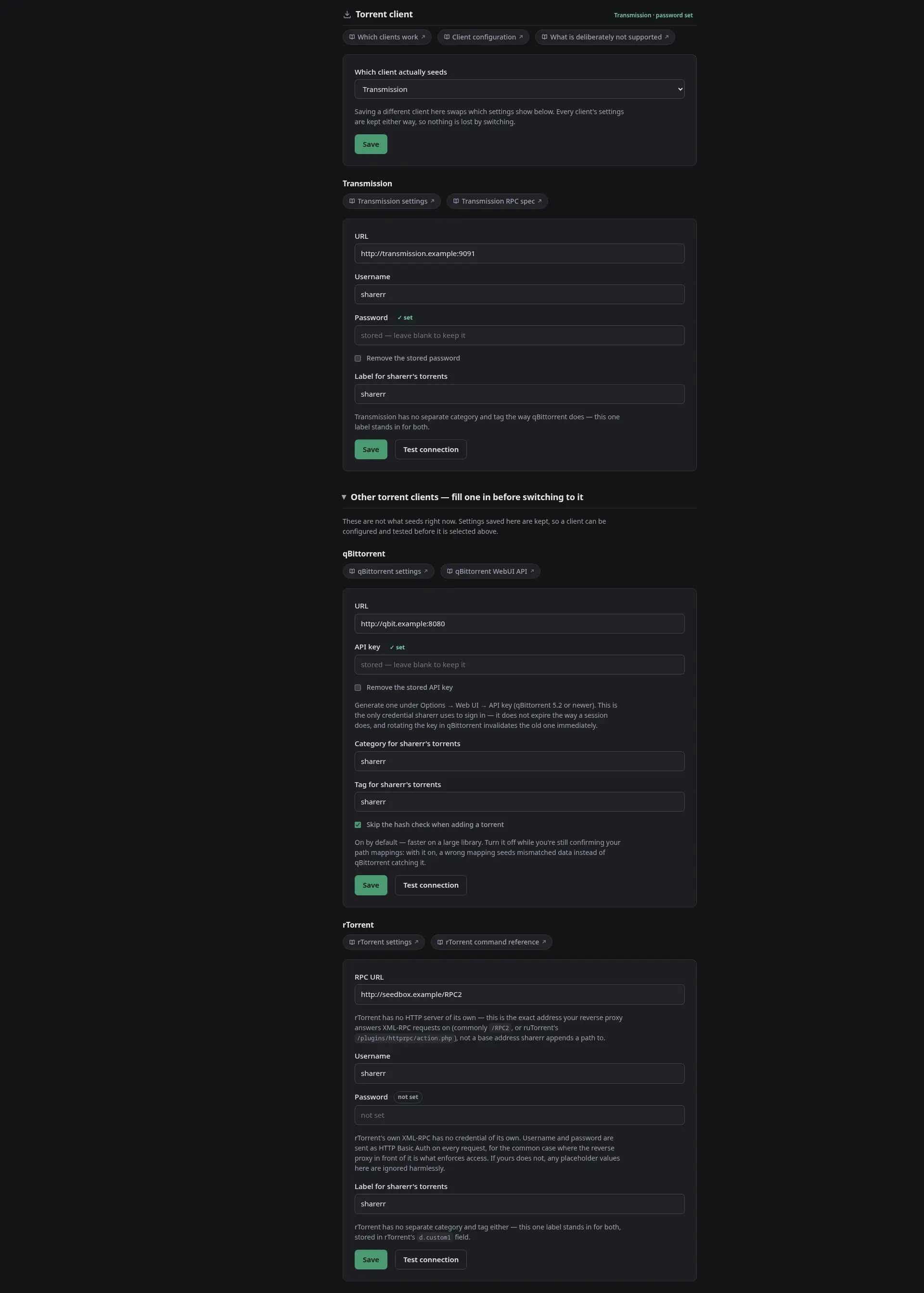
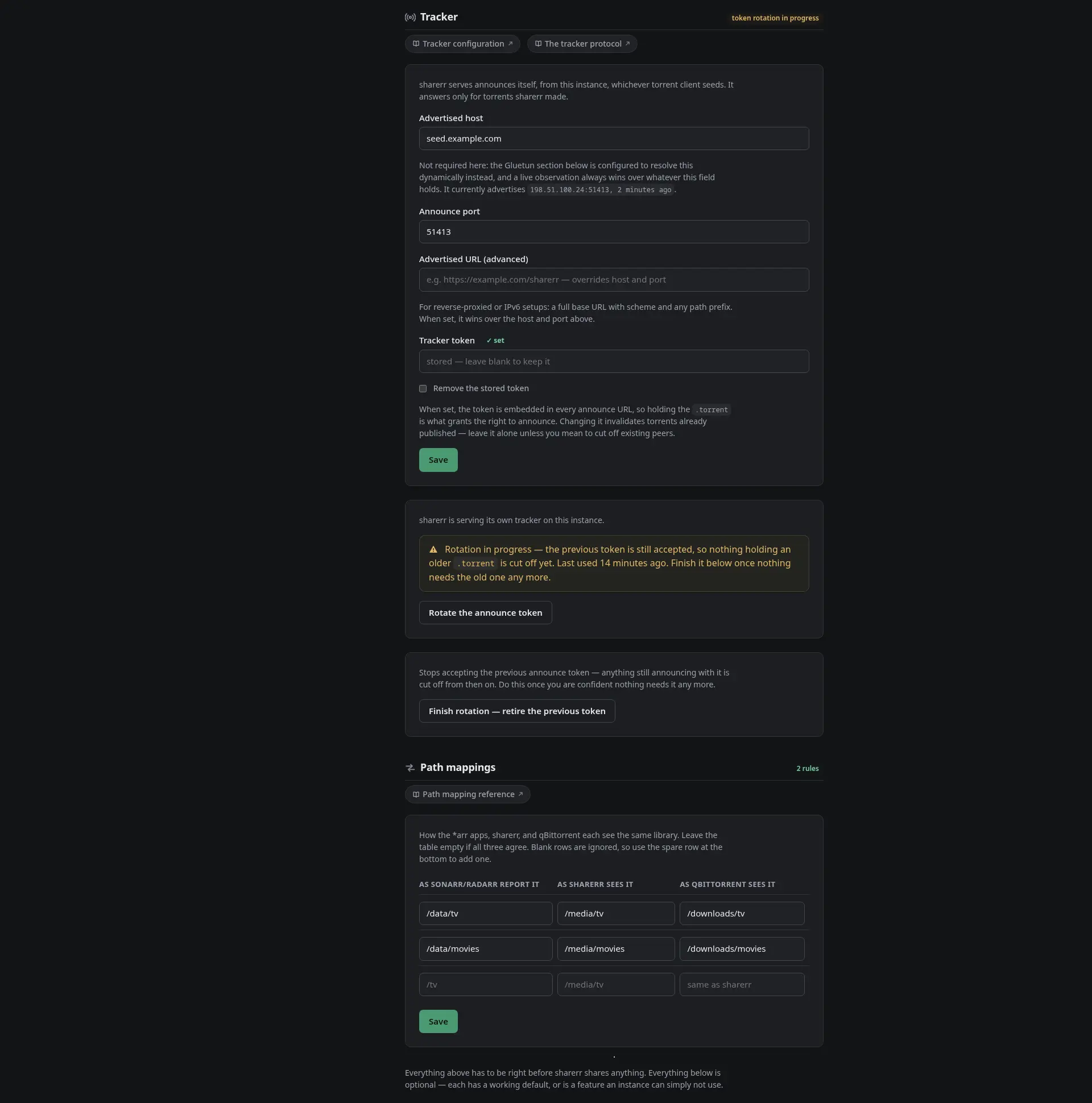
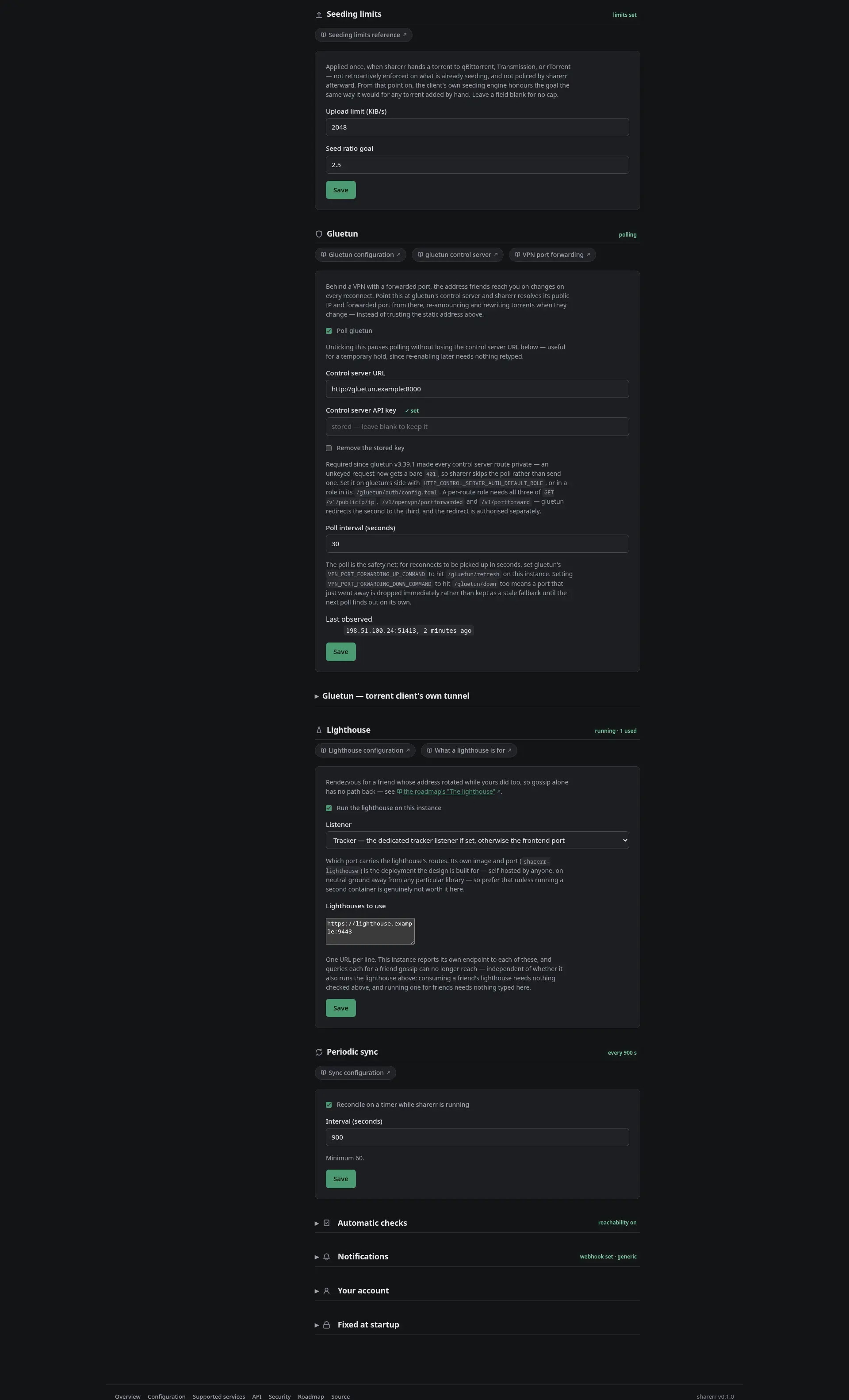
Settings is one long page; it is shown here in four parts, top to bottom.
 |  |
 |  |
Quickstart
docker run -d --name sharerr \
  -p 8477:8477 \
  -e SHARERR_MASTER_KEY="$(openssl rand -base64 32)" \
  -v sharerr-config:/config \
  -v sharerr-data:/data \
  -v /path/to/library:/media:ro \
  ghcr.io/ivylikethevine/sharerr-rs:latest
:latesttracks the newest tagged release. To pin a specific version, useghcr.io/ivylikethevine/sharerr-rs:vX.Y.Z, or to trackmainbetween releases,ghcr.io/…:sha-<commit>(see the tag scheme). Building it yourself withdocker build -f docker/Dockerfile -t sharerr-rs .works too.
Then open http://localhost:8477/. The first visit asks you to create an account; whoever gets there first claims the instance, so do it now rather than leaving it reachable and unclaimed. A short wizard walks through the Sonarr and Radarr URLs and API keys, the qBittorrent URL and API key, the path mappings, and the tracker’s advertised host, or skip it and use Settings, which holds the same fields and everything else. Each service has a Test connection button, and saving takes effect within a second or two, no restart.
Three things to know before going further:
SHARERR_MASTER_KEYis the one thing that cannot come from the UI, because it encrypts the vault the UI writes into. Keep it: losing it means losing every stored credential. See vault secrets.- Two volumes matter.
/dataholds the vault, the database, and the generated.torrentfiles;/configholdssharerr.toml, which the UI rewrites in place. Both must persist. Compose layouts for the common shapes are indocker/deploy/. - Port 8477 carries the web UI, the tracker, and the feed. Anyone who can reach it can reach the login page, and on a plain-HTTP LAN the session cookie travels in the clear. See the security policy for what a TLS-terminating proxy in front changes, and forward-auth sign-in to let Authelia or Authentik sign you in. Without a proxy, turn on two-step sign-in under Settings → Account, so a password alone does not open it.
Sharing with a friend
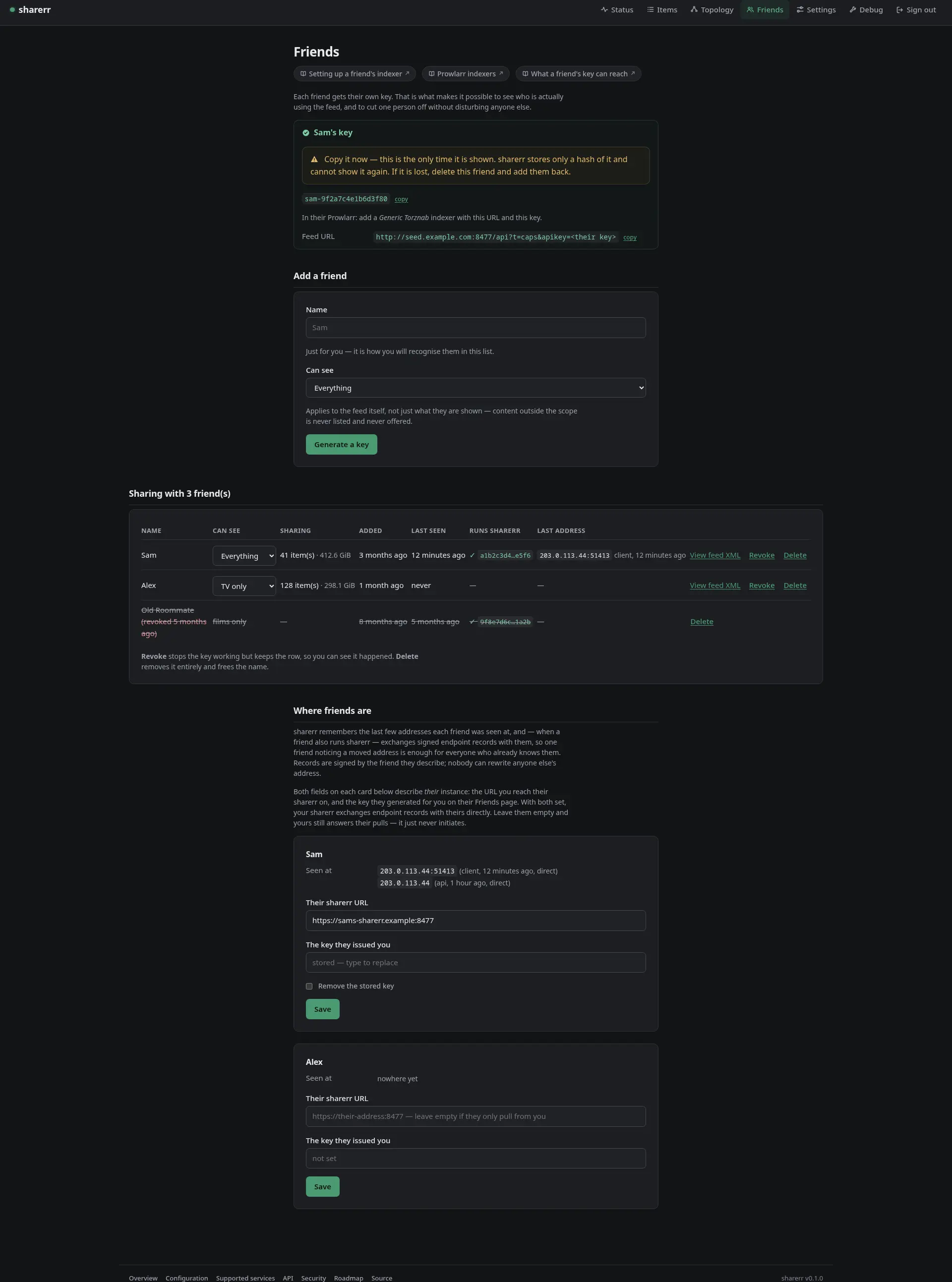
sharerr publishes what it shares as a Torznab feed, which is what Prowlarr speaks. Open Friends, add your friend by name, and sharerr generates a key just for them, shown once, alongside the feed URL. They add a Generic Torznab indexer in their Prowlarr using those two values, or install a sharerr definition made for your address.
Because each friend has their own key, the Friends page can tell you when each of them last used the feed, and until they have, which setup step they are on: key issued, feed pulled, first announce, and (for a friend who runs sharerr) paired. Each friend’s card carries that checklist and a printable setup guide with the feed URL and the Prowlarr steps; printed from the key reveal, the guide carries the key too. Revoking one person leaves everybody else working. That key is also what the feed embeds as the announce token, so revoking a friend cuts their access to sharerr’s tracker too, instantly, with no effect on anyone else. You can also scope what each friend sees: everything, or only TV, films, music or books. Content outside a friend’s scope is never listed and never offered, and they cannot search their way around it. The add form previews the feed a chosen scope would serve before any key exists, and each friend’s row links to the feed their key is served.
Two more controls narrow one friend’s feed. Each friend’s row caps the largest file and highest resolution they are offered, for a friend on a metered line; a file with no known resolution, such as music, stays offered. And a tag named sharerr-<friend> in an *arr app (sharerr-sam, or sharerr-sam-b for a friend called “Sam B.”; the row shows it) shares what carries it with that friend alone. The sharerr tag must still exist, and an item carrying it as well is for everyone in scope. Any sharerr- tag counts, so an item carrying one for nobody on the list is seeded and offered to no one. These decide what a friend’s feed lists, as a scope does, rather than locking the torrent itself. The name comes from the friend’s label, so renaming a friend needs the tag renamed too.
There is no shared feed key. A single
torznab.api_keywould open the feed for everybody and make revoking one friend meaningless, so asharerr.tomlcarrying a[torznab]section is rejected as an unknown key. Issue each friend their own.
If your friend has a client set up for Jackett rather than Prowlarr, it works unmodified: sharerr answers Jackett’s URL shape (/api/v2.0/indexers/<anything>/results/torznab/api) with the same feed, plus its read-only admin endpoints. Jackett’s write endpoints are not implemented; a client that calls one gets a 501 and sharerr logs the exact method and path.
Tag something before your friend adds the indexer. Sonarr and Radarr treat an empty feed as a failed test, so an indexer added before anything is shared will not validate, even though nothing is wrong.
The feed lists only what is actually seeding, and both the feed and the .torrent downloads require the key. The feed URL is built from tracker.advertised_host, so that has to be an address your friend can reach; whatever you do to make port 8477 reachable also makes the tracker and the feed reachable.
The tracker
sharerr serves /announce and /scrape from its own process, whichever torrent client seeds, and answers only for torrents sharerr made. Optionally generate an announce token under Settings → Tracker: it is embedded in the announce URL of every torrent built afterwards, so holding the .torrent is what grants the right to announce.
Rotating that token does not cut off torrents already published. The old token keeps working, unattributed, alongside the new one until you explicitly finish the rotation from Settings; the page shows whether anything has used the old token since, so you can wait until nothing has. This is a safety net for the shared token, not a substitute for per-friend revocation above.
The tracker also keeps count. Every announce carries the client’s cumulative uploaded and downloaded for that torrent; sharerr turns each into the change since that peer’s previous announce and adds it up, so the Status page’s Swarms tile shows how much has been served all-time and the Friends page shows it per friend. Three things to know when reading those figures. They are what clients report, nothing is measured on the wire. The per-friend figure counts only announces carrying that friend’s own key, so a torrent they fetched before their key existed, or one carrying the shared instance token, lands in the instance total but not on their row. And a restart of sharerr serve loses at most one announce interval per peer, since the first announce afterwards is taken as a baseline rather than counted in full. The same totals are exposed as sharerr_transfer_bytes_total on the metrics endpoint.
One caveat: the announce endpoint is part of sharerr serve, so a one-shot sharerr sync produces correct torrents whose announces fail until serve is running. Field reference: [tracker].
Seeding limits
Settings → Seeding limits takes an upload-speed cap (KiB/s) and a seed-ratio goal, applied to each torrent as sharerr hands it to the client and restated on the torrents sharerr already created whenever a value changes:
[seeding]
upload_limit_kib = 500
ratio_limit = 2.0
The client’s own seeding engine honours them from then on, the same as for a torrent added by hand. A changed value reaches every torrent sharerr created on the next sync pass, once; a torrent sharerr adopted keeps whatever limits it had. A blank field is no opinion rather than “no cap”: sharerr sends nothing for it, so a limit you want gone comes off in the client. rTorrent honours the cap but not the ratio; see docs/COMPATIBILITY.md.
Quiet hours (quiet_hours = "01:00-07:00", quiet_upload_limit_kib) lower that cap for a daily window in the container’s time zone, and an item’s page can set the day its share ends; both are in docs/SETTINGS.md.
The same panel also holds two settled roadmap questions, since an operator reasons about them together:
[seeding]
private = true      # default
[feed]
magnet_links = false # default
seeding.private sets BEP 27’s private flag on torrents built from then on — on by default, which is the whole reason sharerr’s own tracker exists. Turning it off lets a client also find peers via DHT and PEX, which means revoking a friend no longer removes them from that torrent’s swarm. feed.magnet_links makes the Torznab and Jackett feeds advertise a magnet alongside the .torrent link, off by default because a magnet can never resolve against a private torrent. Turning it on only ever produces a magnet for an item that is itself not private; the combination “magnets on, everything still private” is accepted but produces nothing, rather than advertising a link guaranteed to stall a friend’s client. See docs/COMPATIBILITY.md for why this was an open question and how it was resolved.
A dynamic endpoint (gluetun)
Behind a VPN with provider port forwarding there is no stable address to type into tracker.advertised_host. Point sharerr at gluetun’s control server instead:
[gluetun]
control_url = "http://localhost:8000"   # sharerr inside gluetun's namespace
poll_secs = 60
sharerr polls gluetun for the exit IP and forwarded port, and torrents carry an announce list spanning the recently held endpoints, so a friend’s client falls back through older tiers after a rotation. When the endpoint changes, sharerr rewrites every cached .torrent (the info hash is untouched) and repoints the tracker lists inside the torrent client immediately. For reconnects to be picked up in seconds, set gluetun’s VPN_PORT_FORWARDING_UP_COMMAND to wget -qO- http://localhost:8477/gluetun/refresh and VPN_PORT_FORWARDING_DOWN_COMMAND to wget -qO- http://localhost:8477/gluetun/down; both only nudge sharerr to re-ask the control server. gluetun’s control server requires an API key (gluetun.api_key in Settings); without one sharerr skips the poll rather than send a request that can only fail.
Two related settings for constrained setups: tracker.advertised_url takes a full base URL for reverse-proxied instances, and tracker.bind opens a second listener carrying only the tracker, for the topology where exactly one forwarded port exists and it has to be the tracker’s. If the torrent client sits behind a different gluetun than sharerr does, a second poller, [gluetun_client], watches that tunnel with the same fields; that layout is docker/deploy/dual-vpn/.
Field reference and how to mint gluetun’s key: [gluetun] and deploying.
The lighthouse
Gossip only helps a friend who can still reach somebody; two friends whose addresses both rotated while neither was watching have no path back to each other. The lighthouse is the rendezvous for that case: a key hash → latest endpoint service, independent of the rest of sharerr, that a peer reports its endpoint to and a friend looks up under the key that peer issued them. A request without a valid key gets a plausible fabricated answer rather than an error, so scraping it yields only noise.
Using one is a Settings → Lighthouse field:
[lighthouse]
urls = ["https://a-friends-lighthouse.example"]
Running one, either as its own container (sharerr-lighthouse, its own image on port 7878) or embedded on one of sharerr’s own listeners, and the design behind the fabricated answers, are in docs/LIGHTHOUSE.md.
Sharing music, books, and more
Each *arr app is its own optional section, and any combination works:
[lidarr]
url = "http://localhost:8686"

[readarr]
url = "http://localhost:8787"

[whisparr]
url = "http://localhost:6969"
Then store each key: printf %s "$KEY" | sharerr vault set lidarr.api_key.
- Tags live on the artist and the author, not the album or the book, so tagging one shares their whole discography or catalogue, the same way tagging a Sonarr series shares every episode.
- Lidarr and Readarr are on API v1, Sonarr/Radarr/Whisparr on v3. sharerr picks the right one per app; you only supply the base URL.
- Whisparr content is categorised as XXX, not TV or Movies, and a friend scoped to “TV only” or “Movies only” does not receive it. Only an unscoped friend does. Whisparr v2 tags per site and v3 per movie or scene; sharerr tells them apart by version.
- Readarr is retired upstream; its maintained fork Bookshelf works as
[readarr]unchanged. Seedocs/COMPATIBILITY.mdfor this and for Sonarr v5’s alternate episode orders.
Friends finding each other
A peer is an identity, not just a credential: sharerr remembers where each friend was recently seen, with their feed traffic and their torrent client recorded separately (a dual-VPN friend has the two behind different exits). Sightings come from authenticated feed pulls, from gossip (when a friend also runs sharerr, the two instances exchange signed endpoint records over the same per-friend key the feed uses, so one friend noticing a moved address is enough for everyone who already knows them), and, when gossip has no path back to a quiet friend, from a lighthouse, ranked below both.
The trust model, stated plainly: every record is Ed25519-signed by the peer it describes, so a friend can relay it but never rewrite it; an older record never overwrites a newer one; a peer’s identity key is pinned on first use; and a gossip pull returns only records for peers the caller proves they already know.
Set it up per friend on the Friends page: their sharerr’s URL, and the key they issued you. Leave both empty and your instance still answers their pulls and accepts their pushes; it just never initiates.
Or pair with one string. When you add a friend, the key is shown next to an invite: one string carrying the key, your address and your gossip identity. A friend who runs sharerr pastes it under Paste a friend’s invite on their Friends page. That adds you, stores the key you issued them, pins your identity, and then their sharerr sends its own side (its address and a key minted for you) back to yours over HTTP, authenticated by the key the invite carried, so both directions are set with nobody typing a second thing. If their sharerr cannot reach yours at that moment, their page shows a reply invite instead; paste that on your Friends page and it fills in the friend it answers rather than adding a new one. The return call only ever fills an empty friendship: it never overwrites an address, key or identity already set. An invite is refused seven days after it was made, so a string left in a chat stops being a credential; a fresh one means deleting and re-adding the friend, since the key inside it is shown only once.
A friend who stops showing up can be reported rather than noticed: with a webhook URL stored as notifications.webhook_url, sharerr POSTs there on whichever of nine triggers are enabled (a sync failing, a friend going quiet or making first contact, the advertised endpoint rotating or the tracker behind it going unreachable, items newly shared or failing to share, a library path becoming unreadable, a friend’s key being revoked), as generic JSON or in Discord’s, Apprise’s, ntfy’s, Gotify’s, Telegram’s or Pushover’s own shape. A tenth, the heartbeat, goes the other way: a push to an Uptime-Kuma-style URL while the instance is ready, so a monitor notices the silence. Field reference: [notifications].
Topology
The Topology page is one diagram of how this instance connects to everything around it: library sources on the left, this instance and its torrent client in the middle, friends on the right. It draws nothing new; every fact on it already lives on Settings, Status, or the Friends page. A solid line to a friend means their address was seen directly, dashed means gossip relayed it, dotted means a lighthouse answered it. Under the diagram, Torrent client shows what the client is actually doing (the one place a torrent paused or removed behind sharerr’s back shows up) and Active swarms lists who is connected to each torrent right now.
Networking only (/topology?view=networking) hides the sources lane. Addresses are redacted by default so the page is safe to screenshot; a checkbox reveals them. Both choices are remembered per browser.
Checking that you are actually reachable
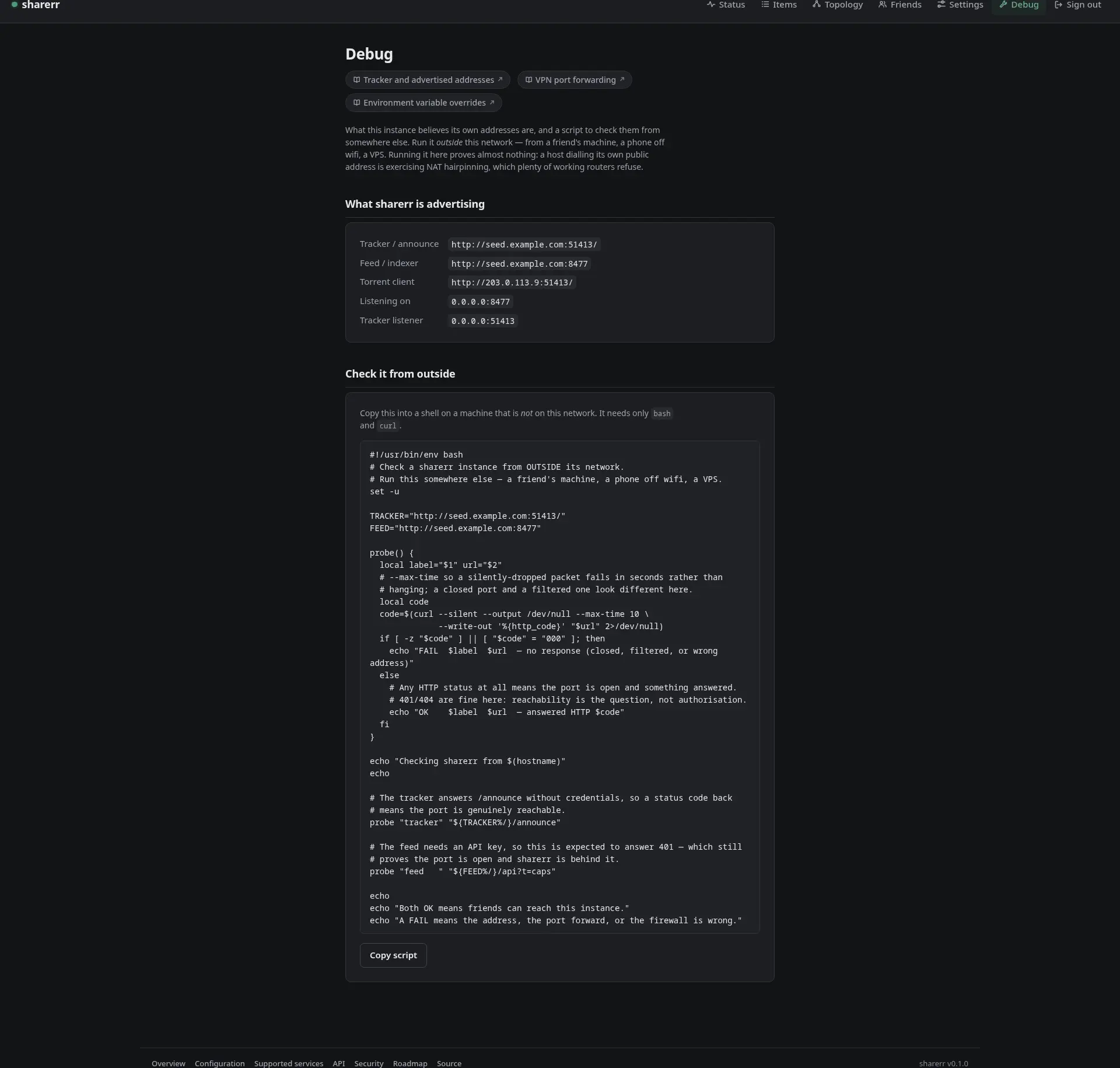
Two separate things, because they answer different questions. Settings → Automatic checks has an opt-in reachability probe that dials this instance’s own advertised addresses from the Topology page; a failure there says could not confirm rather than “your port is shut”, because a host dialling its own public address is exercising NAT hairpinning, which plenty of working routers refuse.
The Debug page settles it. It shows what sharerr believes its own addresses are and hands you a bash + curl script with them filled in. Run it from somewhere else (a phone off wifi, a VPS) and it reports whether the tracker and the feed are reachable from outside. Any HTTP status counts as reachable: the feed answering 401 still proves the port is open.
Sharing a plain directory, no *arr app at all
Point sharerr at a folder and everything in it is shared:
[[library]]
path = "/media/extras"
kind = "movie"   # tv, movie, music, or book

[[library]]
path = "/media/tapes"
kind = "tv"
Each entry is scanned recursively; being in the directory is the tag, and kind decides the feed category and which scoped friends see it.
- No external ids travel with these releases. A friend’s app matches them by parsing the release name alone, so name files the way releases are named:
Show.Name.S01E02.mkv,Film.Title.2019.mkv. Atvfile with noSxxEyyin its name is skipped (anddoctorsays so). - Music and books lean on the directory layout:
Artist/Album/01 - Track.flacandAuthor/Title.epub. - One file, one torrent. An album is shared per track file.
- The directory is never modified, same as everywhere else in sharerr.
Authenticating to qBittorrent
sharerr signs in with a qBittorrent 5.2+ WebUI API key: stateless, no session to expire. Generate one under Options → Web UI → API key, then:
printf %s "$KEY" | sharerr vault set qbittorrent.api_key
Rotating the key in qBittorrent invalidates the old one immediately, so store the new one at the same time. sharerr doctor warns below 5.2.1, which fixed a high-severity SSRF in the WebUI’s redirect handling. Older builds without the API key feature are not supported.
If a correct key is rejected
qBittorrent validates the Host header’s port against the port it listens on, and answers 401 before it reads the key when they differ. A remapped docker port (-p 18080:8080) or a reverse proxy on another port trips this. Either point qbittorrent.url at the port qBittorrent itself listens on, or turn off Options → Web UI → Validate Host header. sharerr doctor names this, rather than reporting “rejected the API key”.
Using Transmission instead of qBittorrent
torrent_backend = "transmission"

[transmission]
url = "http://localhost:9091"
username = "transmission"
label = "sharerr"   # stands in for qBittorrent's category and tag
Then store the password: printf %s "$PW" | sharerr vault set transmission.password. Transmission cannot skip the hash check, so the first add of a large library is slower; the full comparison of the clients is in docs/COMPATIBILITY.md.
Using rTorrent / ruTorrent instead of qBittorrent
rTorrent has no HTTP server of its own, so rtorrent.url is the exact address your reverse proxy answers XML-RPC requests on (commonly /RPC2, or ruTorrent’s /plugins/httprpc/action.php), not a base address sharerr appends a path to:
torrent_backend = "rtorrent"

[rtorrent]
url = "http://seedbox.example/RPC2"
username = "rtorrent"
label = "sharerr"   # stored in rTorrent's d.custom1 field
Then store the password: printf %s "$PW" | sharerr vault set rtorrent.password. Username and password are HTTP Basic Auth for the reverse proxy in front of the RPC endpoint; if yours has none, any placeholder values work. rTorrent always verifies on add, honours the upload cap but not the ratio limit, and cannot replace a stale tracker in place; see docs/COMPATIBILITY.md.
Using Deluge instead of qBittorrent
sharerr talks to Deluge 2’s web UI, which has a password and no accounts:
torrent_backend = "deluge"

[deluge]
url = "http://localhost:8112"
label = "sharerr"   # needs Deluge's Label plugin; without it, torrents go unlabelled
Then store the password: printf %s "$PW" | sharerr vault set deluge.password. The web UI attaches itself to the first daemon its Connection Manager lists. See docs/COMPATIBILITY.md.
The CLI
The UI covers everything, but each verb has a headless equivalent, which is what a scripted deployment or a secrets manager wants. Every command takes --config <path> (or SHARERR_CONFIG), --verbose, and --log-format json (or SHARERR_LOG_FORMAT=json) for one JSON object per log line, the shape Loki and the Docker logging drivers parse.
| Command | What it does |
|---|---|
sharerr serve | The long-running mode: HTTP, the tracker, the feed, and the reconciliation loop. What the container runs. |
sharerr sync | One reconciliation pass, then exit. --dry-run reports what it would do without touching the client. |
sharerr doctor | Checks credentials, service reachability, the tag, and path mapping resolution, the check most likely to explain “nothing is shared”. The same checks back the web UI’s Status page. --fix creates a missing tag or category; --suggest-paths proposes [[path_map]] rules by matching tagged files against a mounted directory (--search-root, default /media), never written automatically. --json prints the same report as one document for a script or a monitor; the exit code is unchanged. |
sharerr vault set <key> | Reads a secret from stdin into the encrypted vault. |
sharerr vault list | Lists which secret keys are set, without their values. |
sharerr vault remove <key> | Deletes a secret from the vault. |
sharerr openapi | Prints the OpenAPI 3.1 document for the machine-facing API (--output writes it to a file). See docs/API.md. |
sharerr preview | Serves every authenticated page with invented data on 127.0.0.1:4877 (--bind to change it), for checking the UI’s layout with no instance behind it. A development aid. |
printf %s "$SONARR_API_KEY" | docker exec -i sharerr sharerr vault set sonarr.api_key
docker exec sharerr sharerr doctor
Any setting can also come from the environment (SHARERR_QBITTORRENT__URL sets qbittorrent.url); a field pinned that way renders disabled in the UI. See environment variable overrides.
Building and testing
Rust 1.98 or newer, then cargo build. Before sending a change, run what CI runs:
scripts/check.sh --install   # once: the pinned lint and scan tools
scripts/check.sh
The default suite is hermetic: no network, no containers, no database. An opt-in second tier (./scripts/run_docker_tests.sh) drives a real *arr + torrent-client stack on synthetic fixtures, and CI runs it weekly. docs/CONTRIBUTING.md has the verification loop, the lint policy, the MSRV check, and what CI runs; docs/TESTING.md has the tiers.
Layout
Twelve crates, one workspace, two binaries. The crate map, how a share moves end to end, and where state lives are in docs/ARCHITECTURE.md; the original design brief and the two premises the implementation disproved are in docs/DESIGN.md.
Getting help and contributing
docs/SUPPORT.md says where to ask (issues, discussions, the private security route), what to include, and what to expect from a one-person project. To send a change, start with docs/CONTRIBUTING.md.
AI usage
Heavily inspired by: Dictionarry/Profilarr’s AI Transparency Statement
I have used generative AI to write large parts of this project. All of the code here is my responsibility regardless: AI is a tool, not an owner of a project. I have personally understood, reviewed and approved all of the AI-generated code in this repository, and mainline releases carry the same accountability to me as anything I write and publish myself.
Roadmap
Licence
MIT — see LICENSE.