hi.sh -> sshrc supercharged
EXPERIMENTAL UNTIL v1.0.0
Don’t sshush your hosts, say hi!
hi <host> is ssh <host> with your shell setup along: the session opens with your prompt, your aliases, and your editor configs, on a host that has none of them, and what hi put there is removed when it ends. Nothing is installed on the host. The same command opens a session in a container, a Nomad allocation, or a Kubernetes pod.




View these docs as a website here.
New here: docs/GETTING-STARTED.md has the words these docs use and a starting path for the way you work. docs/README.md indexes the rest, the man page and the tldr draft included.
Contents
- In Sixty Seconds
- What You Get
- Target Requirements
- Installation
- Configuration
- Built from/with/in mind
- say-hi and the alternatives
- Testing
- Getting help and contributing
- AI usage
- Roadmap
- License
In Sixty Seconds
git clone https://github.com/ivylikethevine/say-hi ~/say-hi   # the directory has to be named say-hi
~/say-hi/scripts/install.sh    # wires your shell's rc file and asks one question
exec $SHELL                    # reload
hi <anything>                  # ssh, with your prompt, aliases, and editors along
No sudo: the install links ~/.local/bin/hi and writes only to your rc files and ~/.config/say-hi. --preset balanced answers without asking, --dry-run shows every write first, and hi --configure has the settings menu.
What You Get
Each GIF below is one persona’s real config - the settings behind every one are in docs/SETTINGS.md. Most leave the laptop as it is (_HI_DISABLE_LOCAL=1), so the outside prompt is its distro’s own and hi begins at the target.
Connect Via More Than SSH
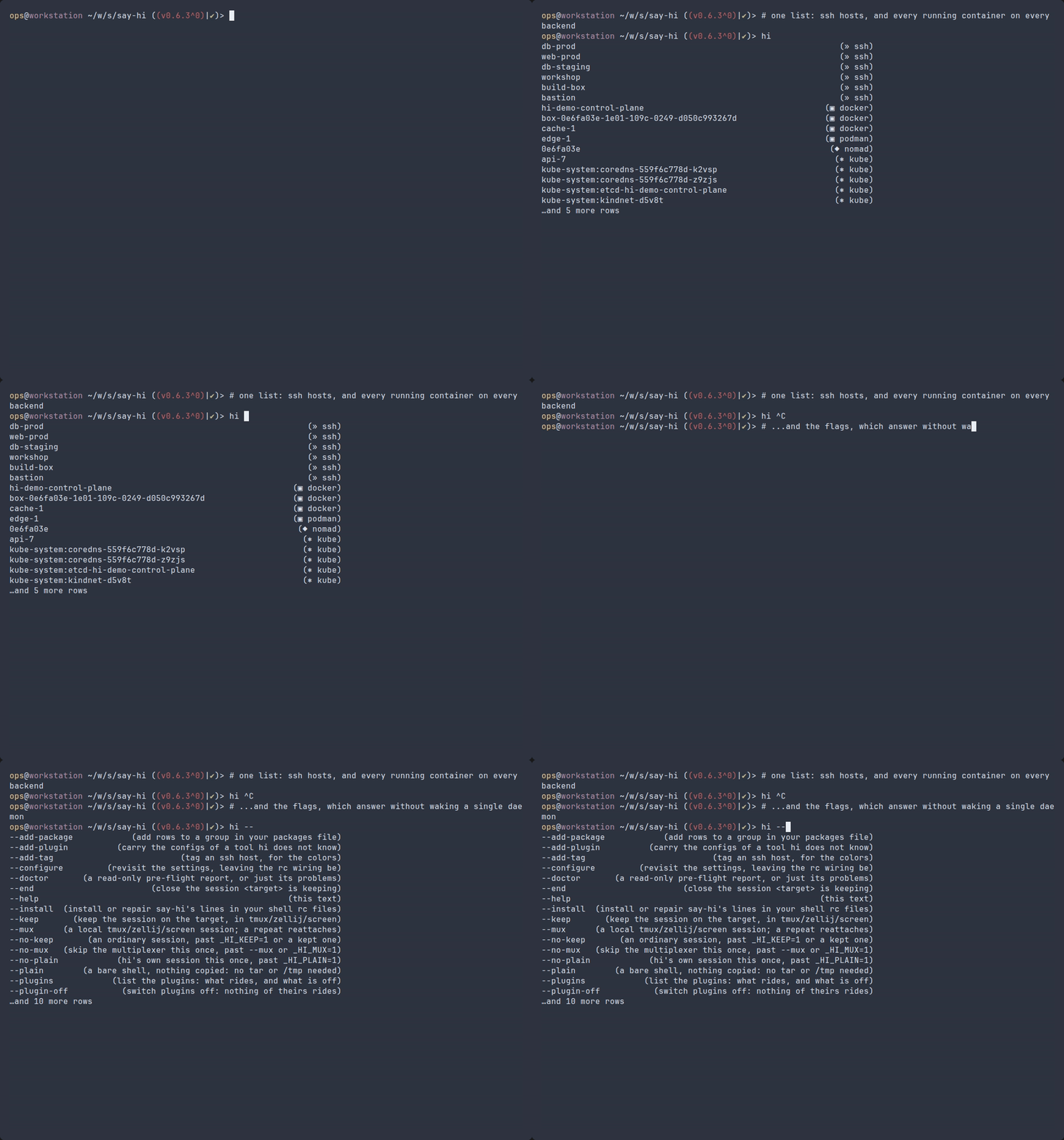
hi <TAB> answers with the Host entries in ~/.ssh/config and every running container, allocation, and pod, each tagged with its backend; hi --<TAB> answers hi’s own flags without probing any backend. An operator at a workstation, in fish for its pager’s description column.
The Header Tells You What’s Missing
A package check of the tools you care about, in groups you switch on, in one packages file (a copy of your own replaces the shipped one); the header checks it on every target — one quiet line on a box that has them, a loud one on a box that does not. A homelab: bash from an Ubuntu laptop into the nas and the pihole, each keeping its distro’s prompt — hi’s is off (_HI_DISABLE_PROMPT=1), and the header, the check, and the aliases ride along anyway.

One Config Directory, Every Host, Every Shell
~/.config/say-hi/ ships to every target: one aliases.sh alias works in a bash session on a debian container and a fish session on an alpine box, reached through docker and podman. The operator again, in fish’s own prompt at the workstation and hi’s on both boxes, with the header trimmed to the clocks, the backend counts, and the check on a blue-to-red ramp of their own. A box with no bash gets the aliases-only tier — hi’s own aliases, not the overlay (docs/COMPATIBILITY.md).

Your Editors
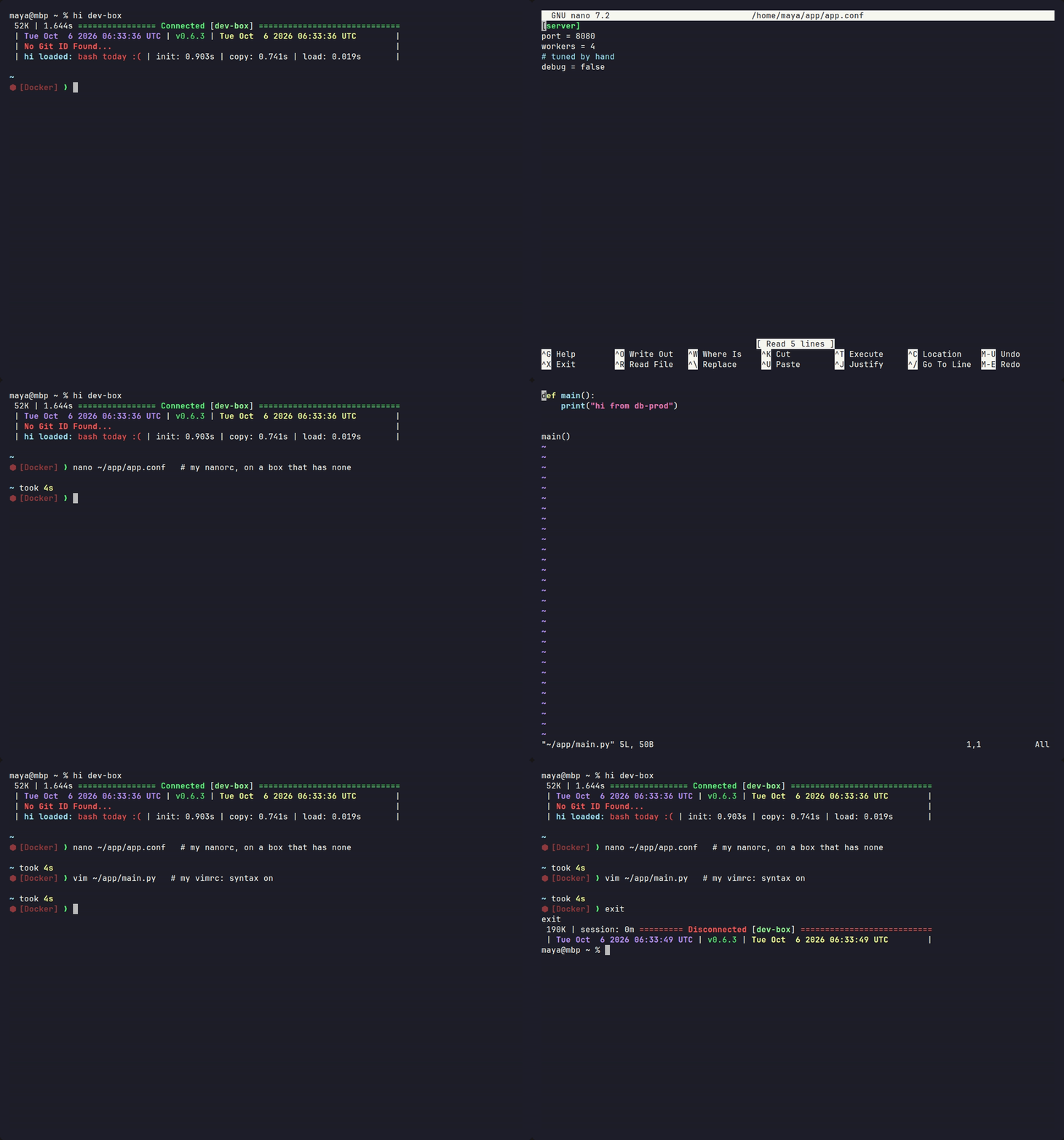
nano and vim open with the nanorc and vimrc you keep at home (or an overlay copy), on a box with none of those files, and nothing is installed or left running on the target. A developer, zsh on a Mac with its stock prompt, into the team’s shared dev box, where the prompt is starship’s, not hi’s (_HI_PROMPT_TOOL=starship; hi keeps the header, editors, and aliases).
Know Where You Are at a Glance
# Tags: lines in ~/.ssh/config, a colors overlay pinning each tag, and hi --preview colors to see what every host resolves to — then a prod host lands in red and a dev host in green. A sysadmin, bash from a laptop where the prompt is hi’s too (_HI_PROMPT_TOOL=hi), into two fish ssh hosts, with a two-line fish prompt of their own riding the overlay, drawn on the colors hi resolved.

One Command, Any Backend
hi <name> <command> runs one command inside the session and only its output comes back: the same loop over an ssh host, a docker container, a nomad allocation, and a kubernetes pod (-F is ssh’s, passed through unchanged; the recording’s ssh config is a throwaway). The pod is busybox ash with no bash — the aliases-only tier — and hi says so, once, and runs the command anyway. A researcher, in zsh on a Fedora laptop, sweeping the cluster’s backends.

Target Requirements









Which OSes hi lands a session on, which shell you end up in, what proves each row, and everything answered no, and why: docs/COMPATIBILITY.md.
- Client:
bash3.2+ andbase64(coreutils, busybox, macOS/BSD, and Git Bash all ship one;openssl base64stands in where none does),sshfor ssh targets, any ofdocker/podman/nerdctl/finchandnomad/kubectlfor those backends. hi has no protocol of its own:sshis the transport,base64is armor, not crypto (docs/SECURITY.md). - Target:
base64(oropenssl) for ssh targets; nothing extra for container/alloc/pod targets.bashgets the full session; without it you land in the best shell the target has, with a smaller one (docs/COMPATIBILITY.md). - A slow link: the ssh wire is meant to stay at or under 128 KB — 8 s over a 128 kbps link — and the gzipped payload is held to 64 KB by the bench group. The payload badge above is today’s wire size.
- bash 3.2 is the floor on both ends (macOS still ships it; what that rules out of the code is docs/CONTRIBUTING.md), fish 3.4 (Alpine 3.16’s) and zsh 5.5 (RHEL 8’s) for the other two shells hi styles.
- Everything else is plain POSIX/bash/zsh/fish — no compiled artifacts, no package manager, no build step.
Installation
-
The
.deb/.rpm/.apkare on the releases page, and the package repository serves them signed and subscribable, so upgrades ride your package manager:# Debian, Ubuntu sudo curl -fsSLo /etc/apt/keyrings/say-hi.asc https://ivylikethevine.github.io/say-hi/say-hi.asc echo 'deb [signed-by=/etc/apt/keyrings/say-hi.asc] https://ivylikethevine.github.io/say-hi/apt stable main' | sudo tee /etc/apt/sources.list.d/say-hi.list sudo apt update && sudo apt install say-hi # Fedora, RHEL, and derivatives sudo curl -fsSLo /etc/yum.repos.d/say-hi.repo https://ivylikethevine.github.io/say-hi/say-hi.repo sudo dnf install say-hi # Alpine wget -O /etc/apk/keys/say-hi.rsa.pub https://ivylikethevine.github.io/say-hi/say-hi.rsa.pub echo https://ivylikethevine.github.io/say-hi/apk >>/etc/apk/repositories apk add say-hiA packaged install still needs
hi --installonce per user, for the rc lines; it leaves the package’s/usr/bin/hito the package manager. macOS:brew install ivylikethevine/tap/say-hi(the tap), thenhi --install. say-hi/scripts/install.sh, orhi --installonce hi is on yourPATH. It syntax-checks~/.bashrc,~/.zshrc, and~/.config/fish/config.fishwith each shell’s own checker first and asks before continuing if any fails (--yesanswers it). Your login shell is wired, and any other of the three with an rc file already;--shell bash,zshnames them instead, andallis every one installed. Each line tests for the tree first, so a deleted checkout costs a shell nothing. On macOS~/.bash_profileis taught to read~/.bashrc. A first install asks whether hi styles this machine too, and nothing else. For an rc file a dotfile manager owns,--print-rcprints each block and writes none (docs/SETTINGS.md).hiis linked at~/.local/bin/hi(--link systemfor/usr/bin/hi,--link nonefor no link — the wired shells alias it either way). Then reload your shell. zsh completeshithrough thecompinityour~/.zshrcruns, before hi’s line or after it; hi runs none of its own.hi --configurereopens the settings menu: pick a preset, or flip any setting on its pages — Header, Package check, Prompt, Plugins, Aliases, This machine, Advanced — and save to~/.config/say-hi/settings.sh(Configuration).hi --doctor [<target>]when something is slow or failing (--problemsfor only what needs fixing,--jsonfor a bug report); it also reports which rc files are wired and wherehion yourPATHleads. docs/TROUBLESHOOTING.md goes symptom by symptom.hi --updatemoves a cloned install to the newest release tag, or on thedevbranch fast-forwards it (--dry-runsays what it would do; a package upgrades through its package manager).hi --add-package core bat,batcatadds a row to thecoregroup of~/.config/say-hi/packages, copying the shipped roster there first;hi --remove-package battakes it out again.hi --add-tag web1 prodwrites the# Tags: prodline aboveHost web1in~/.ssh/config, which ahosttagrow then colors (docs/COLORS.md).hi --set-color hostname prod-db yellowpins a color in~/.config/say-hi/colors, copying the shipped pins there first;hi --unset-color hostname prod-dbremoves the pin.hi --pluginslists every config hi carries to a target, and what rides;hi --plugin-off lazygit editorskeeps a plugin or a whole group home andhi --plugin-onbrings it back;hi --add-pluginandhi --remove-plugincarry the configs of a tool hi does not know (docs/SETTINGS.md).- The whole surface is twenty-six flags:
hi --help(or barehi) lists them, docs/USAGE.md shows what each prints,man hiis the long form, and everything hi does not answer goes tossh. - A dropped connection ends the session and nothing on the target outlives it, unless you ask:
hi --keep <target>runs the session intmuxorscreenon the target, the nexthi <target>reattaches, andhi --end <target>or a day unattended closes it.hi --mux <target>does the wrapping on your side instead, in a localtmux,zellij, orscreen(both). -
Done with it?
hi --uninstall(orscripts/install.sh --uninstall) strips hi’s lines from your rc files, removes thesettings.shit wrote, and unlinks~/.local/bin/hi(or a/usr/bin/hiof its own making; a package’s stays). A one-time<rc>.hi-origbackup goes once the rc matches it again; one that differs is kept, with the differing lines printed. Left behind on purpose: the checkout or package (apt remove say-hiand friends), and the rest of~/.config/say-hi(--purgeremoves that too).--dry-runnames what would go. To take it all off a cloned install:hi --uninstall --purge && rm -rf ~/say-hi
Configuration
Your config lives in ${XDG_CONFIG_HOME:-$HOME/.config}/say-hi/ and rides along to every host you say hi to. settings.sh is what hi --configure writes; the install copies nothing else there, so the shipped colors and packages apply until you copy one out of the tree’s config/ to edit (hi --add-package and hi --set-color do the copying) or add an aliases.sh of your own. The editor rcs need no copy: hi carries your own ~/.vimrc, ~/.config/nvim/init.lua, ~/.nanorc, or ~/.emacs (why that works). The overlay file table, the settings menu, and every setting are in docs/SETTINGS.md; how a session reaches the target is How it works. The tools hi wires in where a target has them — your prompt program, mise, direnv, bat, eza, and more — are docs/INTEGRATIONS.md.
IMPORTANT: every overlay file in that directory is copied to every host you say hi to — keep local-only lines (a token, an internal hostname) in ~/.bashrc and friends instead. What lands on a target, and that it is removed on exit: docs/SECURITY.md.
Hostname, Username, and Group/Tag Colors
Every username and hostname gets a color derived from its name; a line in ~/.config/say-hi/colors (prod-db = "yellow" under [hostname], which hi --set-color hostname prod-db yellow writes) pins one, and hi --preview colors shows what every host and your user resolve to. Tags (# Tags: lines in ~/.ssh/config, which sshm writes), patterns, truecolor schemes of your own, and using the hash in your own prompt: docs/COLORS.md.
Built from/with/in mind
- sshrc — from — (became
hi.sh) - sshm — with — (optional, but highly recommended for
~/.ssh/confighost tags) - bat — in mind — (the reason the aliases.sh fallthrough logic works as portably as it does;
batis sometimesbatcat) - eza — in mind — (and its predecessor exa: colorized
lsupgrades, both supported, with each one’s flags kept apart for older hosts) - fish — with — (my preferred shell: its defaults/built-ins are easy to understand, but it is not POSIX)
say-hi and the alternatives
How say-hi compares to similar tools, and when to use something else: docs/ALTERNATIVES.md.
Testing
tests/test_runner.sh runs the suites with a colored pass/fail summary; --group fast and --group lint are the gate CI runs on every push. Runbook: docs/TESTING.md.



Both coverage badges measure the shipped product over the full sweep and gate nothing; read their average as the figure (why two).
Getting help and contributing
A question, a bug, or an idea: docs/SUPPORT.md says where each one goes and what to bring (hi --doctor --json answers most of it). Anything exploitable goes privately, per docs/SECURITY.md. A change: docs/CONTRIBUTING.md has the gate, what a review bounces on, and which docs change with what; who decides is docs/GOVERNANCE.md.
AI usage
Heavily inspired by Dictionarry/Profilarr’s AI Transparency Statement.
This started as code written entirely by me, but I have used generative AI to write large parts of it. All of the code here is my responsibility regardless: AI is a tool, not an owner of a project. I have personally understood, reviewed, and approved all of the AI-generated code in this repository, and mainline releases carry the same accountability to me as anything I write and publish myself.
Roadmap
What’s left; nothing here is parked or descoped. One list, in the order the work is best done: what CI has yet to show, then the 1.0 tag. An entry is deleted once its Ticks when holds. Post 1.0 entries are outside this checkout: an account or an upstream review that lands when it lands.
-
Before 1.0: A blocked upstream shows as drift — shipped:
check_tool_versions.shcounts a problem, naming the host, when no lookup on one host answered (a blocked host, not a one-off rate limit). What is left is seeing it in CI. Ticks when: atool-versions.ymldispatch with one upstream host removed fromallowed-endpointsopens the tracking issue naming it. -
Before 1.0: The wizard switches a default-off plugin on — the
hooksplugins (default = "off") move through_HI_PLUGINS_ON, which onlyhi --plugin-onwrites; the wizard’s Plugins page shows them but cannot turn one on (docs/SETTINGS.md). Do: give the page a third state for a default-off plugin and have it write_HI_PLUGINS_ONas--plugin-ondoes. Ticks when:hi --configureturns zoxide on and the next connect runs its init. -
Before 1.0: A plugin’s init is checked without
tr—scripts/pack.sh’s_hi_plugin_init_okpipes the init throughtr, and the macOS fast suites printtr: command not foundfrom it where a case runs with a cut-downPATH; the cases pass, so nothing shows whether an init is then turned away. Do: make the check with builtins that parse under bash 3.2, and add a case that runs it with notronPATH. Ticks when: the macOS fast job’s log has nocommand not foundline frompack.sh. -
At the 1.0.0 tag: A stability contract is written down — docs/CONTRIBUTING.md’s What 1.x will not break. Ticks when: the tag commit turns
docs/SECURITY.md’s Supported versions prose into its version table. -
Post 1.0: tldr page —
docs/tldr.mdmatchesdocs/hi.1and upstream style. Do: open the PR against tldr-pages. Ticks when: merged. -
Post 1.0: Best Practices badge — the answers are in docs/OPENSSF-IMPROVEMENTS.md. Do: settle its three flagged rows (
small_tasks,secure_2FA,hardened_site) and enter it at bestpractices.dev. Ticks when: the live entry matches the sheet. -
Post 1.0: AUR — registration is closed to new accounts, so
publish-external.yml’saurjob is written but unexercised. When it reopens: register, addAUR_SSH_KEYto thereleaseenvironment, and push each package once by hand (docs/RELEASING.md). Ticks when: both packages are live and a dispatch has keptsay-hicurrent for one release.
License
MIT.